Showing posts with label Game. Show all posts

Saturday, 31 August 2013

Play PS2 Games From Computer Server

Unknown | 31.8.13 | | Best Blogger Tips


PS2 စက္မ်ားကုိ Computer Server, Usb Hdd, Usb Stick
မ်ားႏွင့္တြဲဖက္ကစားႏုိင္ရန္ PS2 စက္မ်ားသည္ PS2 Memory Card မွ Boot
တက္ႏုိင္ေသာ Model မ်ားျဖစ္ရမည္။


eg. 70009 series, 90006(old model)

not new model 


memory
card နဲ႕ boot မတက္ႏုိင္တဲ့ model ေတြအတြက္ လဲ CD/DVD ကေနဘုတက္လုိ႕ရပါတယ္
ဒါေပမယ္ ps2 စက္ရဲ႕ len မေကာင္းရင္ေတာ့သိပ္အဆင္မေျပဘူူးဗ်။ ဂိမ္းေတြကုိ

computer,
hdd, stick ထဲသြင္းျပီးကစားရတဲ့ရည္ရြယ္ခ်က္ကေတာ့ len
ကုိအသုံးမျပဳခ်င္လုိ႕ဘဲဗ်။

 အပ်က္အမ်ားဆုံးကလဲ len ဘဲ ကၽြန္ေတာ္ဆုိ
စက္အေဟာင္းေတြ၀ယ္ျပီးဆုိင္ဖြင့္ထားတာ

အခုထိ တစ္လုံးမွ မပ်က္ေသးဘူး။ len
ေတြကသုံးမွမသုံးတာ။ ဒါေပမယ္ memory card ကေန ဘု တက္ႏုိင္ေအာင္ modified
လုပ္လုိ႕ရတယ္ဗ်။ ပုိက္ဆံေတာ့ကုန္တာေပါ့ဗ်ာ။

modified လုပ္တယ္ဆုိတာ
စက္ထဲမွာ ပါတဲ့ main board ေအာက္မွာရွိတဲ့ ic ေလးကုိ mobo4.0 ic ေလးနဲ႕
လဲတပ္ရတာ တစ္ေသာင္းခြဲ၊ ႏွစ္ေသာင္းေလာက္ကုန္တယ္ဗ်။


ဒီနည္းပညာကုိအသုံးျပဳမယ္လုိ႕ရည္ရြယ္ထားသူေတြအတြက္ေတာ့ ကၽြန္ေတာ့လုိ စက္ေမာ္ဒယ္အေဟာင္းေတြ၀ယ္ျပီးသုံးတာအဆင္ေျပတယ္ဗ်။

ကဲ memory card (PS2) ကေန boot တက္မတက္ဘယ္လုိစမ္းမလဲ ဆုိတာ ေအာက္မွာ ေျပာျပသြားမယ္ဗ်ာ။


Step - (1)

မထမအဆင့့္အေနနဲ႕
freemcboot ကုိ PS2 memory card ထဲကုိ install လုပ္ပါမယ္ ။ freemcboot.iso
ဖုိင္ကုိ downlaod လုပ္ျပီး CD (4x)speed နဲ႕ ကူးလုိက္။

ျပီးရင္ PS2
စက္ထဲကုိထဲ့လုိက္။ PS2 memory card ကုိလဲ PS2 စက္မွွာ တပ္လုိက္။ ျပီးရင္
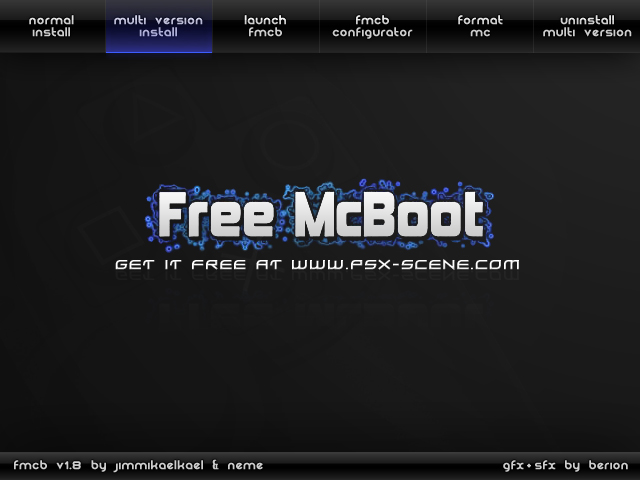
စက္ကုိ ပါ၀ါဖြင့္လုိက္ ဒီအတုိင္းေတြ႕ရလိမ့္မယ္။  

အဲဒီထဲကမွ normal
install ကုိေရြးေရြး multi install ကုိေရြးေရြး ရတယ္။ ျပီးရင္ ok
ႏုိပ္လုိက္ ။ install လုပ္ေနတဲ့ပုံကုိေအာက္မွာျပထားတယ္။
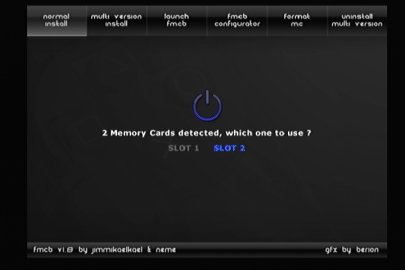
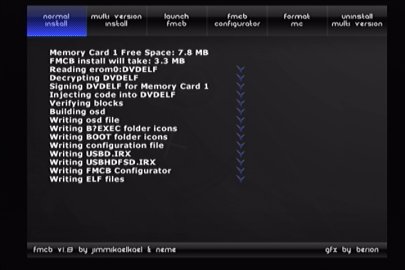


memory
card ထဲကုိ freemcboot install လုပ္ျပီးရင္ စက္ကုိပိတ္။ CD ေခြကုိထုတ္ျပီး
memory card တပ္ ျပီးစကုိျပန္ဖြင့္ freemcboot ဆုိျပီး memory card ကေန

boot
တက္လာလိမ့္မယ္။ တကယ္လုိ႕ freemcboot ဆုိတဲ့ စာတန္းနဲ႕မတက္ဘဲနဲ႕ sony main
screen နဲ႕တက္လာရင္ေတာ့ အဲဒီစက္က memory card ကေန ဘုမတက္ႏုိင္ဘူးဗ်။

modified လုပ္မွရမယ္။ မလုပ္ခ်င္လဲ CD/DVD ကေနဘုတက္လုိ႕ေတာ့ရတယ္ဗ်။ အဲဒီနည္းကုိေနာက္မွေျပာျပေတာ့မယ္ဗ်ာ။


Step(2)

သူ႕ထဲမွာပါတဲ့
hdloader က network အတြက္သိပ္အဆင္မေျပဘူးဗ်။ ဒါေၾကာင့္ ကၽြန္ေတာ္တုိ႕က
openps2loader v 0.8 ကုိ memory card ထဲကုိထည့္ရဦးမွာ။

OPNPS2LD.ELF
နဲ႕ SYS-CONF ဖုိဒါ ကုိ downlaod လုပ္လုိက္။ ျပီးရင္ usb stick
ထဲကုိထည့္လုိက္။ usb stick ထဲကေနမွ အဲဒီဖုိင္ႏွစ္ခုကုိ ps2 memory card
ထဲကုိထည့္ရမွာေနာ္။

 usb stick ကုိ ps2 စက္မွာ တပ္လုိက္။ memory card ကုိလဲတပ္ထားရမွာေနာ္။


ျပီရင္စက္ကုိဖြင့္လုိက္
freemcboot တက္လာလိမ့္မယ္။ အဲဒီထဲက ulunchelf ကုိေရြး။ အဲဒီထဲကမွ browser
ကုိေရြး mc0: = ps2 memory slot 1 ၊ mc:1 =ps2 memory slot 2 ,

mass0: = usb လုိ႕သိထားရမယ္ဗ်။ ကၽြန္ေတာတုိ႕က stick ထဲက ဖုိင္ေတြကို ps2 memory card ထဲကုိထည့္မွာဆုိေတာ့ အရင္ဆုံး stick ထဲသြားရမယ္။


stick
ထဲကဖုိင္ကုိ ကူမွာဆုိေတာ့ mass0 ကုိသြားျပီး OPNPS2LD.ELF ဖုိင္ကုိ ေရြး
ျပီးရင္ R1 ႏုိပ္ copy ကုိေရြးခဲ့ ေနာက္ျပီး mc0: ကုိသြား အဲဒီထဲက boot
ထဲကုိ၀င္ ျပီးရင္ R1 ကုိႏုိ္ပ္ past ကုိေရြး ဒါဆုိ boot ဖုိဒါထဲမွာ
OPNPS2LD.ELF ေရာက္သြားျပီ။ ျပီးရင္ ၾတိဂံ ႏုိပ္ျပီးျပန္ထြက္။ mc0: ထဲက
SYS-CONF ဆုိတဲ့ ဖိုဒါ ကုိ R1 ႏုိပ္ delete နဲ႕ဖ်က္လုိက္ ျပီးမွ
အဲဒီေနရာက္ကုိ ေဒါင္း ထားတဲ့ SYS-CONF folder ကုိ stick ထဲကေန အေပၚက လုိ
copy past လုပ္လုိက္ဗ်ာ။ ဒါဆုိျပီးသြားျပီ။ စက္ကုိ restart ျပန္စလုိ္က္
Aspiresps2loader ဆုိတာပါလာလိမ့္မယ္ အေစာကေတာ့အဲဒီေကာင္မပါဘူးေနာ္။sys file
က ကၽြန္ေတာ္ျပင္ေရးထားတာ။ျပင္ေရးထားတာဆုိလုိ႕ အထင္မၾကီးနဲ႕ notepad
နဲ႕ဖြင့္ ျပီး ျပင္ရတာလြယ္လြယ္ေလးရယ္ဗ်။ဒီမွာသြားေလ့လာလုိက္
http://home.comcast.net/~jnabk3/guides/edit.html   ဒါဆုိရင္ေတာ့ memory
card အပုိင္းကေတာ့ျပီးျပီ။


Step-(3)

ကြန္ပ်ဴတာမွာ ဂိမ္းေတြသြင္းဖုိ႕ျပင္္ဆင္ရေအာင္

ဂိမ္းသြင္းမဲ့
partation က အနည္းဆုံး 300 G ေလာက္ရွိမွ အဆင္ေျပမယ္ ဒါမွ
ဂိမ္းေတြေတာ္ေတာ္မ်ားမ်ားထည့္လုိ႕ရမွာေပါ့။ ျပီးရင္ အဲဒီ partation က NTFS
ဆုိမရဘူး ps2 စက္ကမသိဘူးဗ်။


FAT32 မွရတယ္။ အရင္ဆုံး NTFS နဲ႕ format
ခ်လုိက္ ျပီးမွ FAT32 ေျပာင္းရေအာင္ ul_format.exe ဆုိတာေလးေဒါင္းလုိက္
ျပီးရင္ drive C: ေအာက္ကုိထည့္လုိက္။ ျပီးရင္ run box ကုိဖြင့္

cmd
လုိ႕ရုိက္ အဲဒီထဲမွာ cd\ လုိ႕ဆက္ရုိက္ C:\> ေအာက္ေရာက္သြားေရာ အဲဒီထဲမွာ
အေစာကထည့္ထားတဲ့ ul_format.exe ဆုိတဲ့ဖုိင္ရွိတယ္ေလ။ ျပီးရင္ ul_format
space တစ္ခ်က္ျခား format ခ်မဲ့ drive နာမည္ရုိက္ space တစ္ခ်က္ျခား FORMAT
လုိ႕ရုိက္လုိက္ [ ဥပမာ - ul_format D FORMAT] format ခ်မယ့္ drive က E
ဆုိရင္D ေနရာမွာ E လုိ႕ ရုိက္ေပါ့ဗ်ာ။ ျပီးရင္ (Y or N) ေမးရင္ y
ကုိႏုိပ္ေပးလုိက္ ဒါဆုိ FAT32 ျဖစ္သြားျပီ။ ဂိ္မ္းေတြသြင္းရေအာင္ဗ်ာ။


Step (4)

ဂိမ္းေတြသြင္းဖုိ႕USBUtil
v2.00 Full ဆုိတဲ့ software ေလးကုိေဒါင္းလုိက္ဦး။ အဲဒီေကာင္ေလးက portable
ေလးရယ္ double click လုိက္ပြင့္လာလိမ့္မယ္ဗ်။

ဂိမ္မသြင္းခင္
ဂိမ္းသြင္းမယ့္ drive ကုိဖြင့္ အဲဒီထဲမွ GAME ဆုိတဲ့ folder တစ္ခုေဆာက္
အဲဒီဖုိဒါ ထဲမွာ ဂိမ္းေတြထည့္ရမွာ။ျပီရင္အဲဒီဖုိဒါကုိ share ေပးရမွာ။

အဲဒီ
ဖုိဒါေပၚကုိ right click share and security ကုိေရြး share this folder on
the network ေဘာက္ေရွကအကြက္ေလးထဲမွာႏုိပ္လုိက္ ျပီးရင္ ေအာက္က

allow network user မွာလဲ အမွန္ျခစ္လုိက္ ဒါဆုိ share ေပးျပီးသြားျပီ။


ကဲ
USBUtil ကုိဖြင့္လုိက္ဗ်ာ ျပီးရင္ File - Create[Game\ISo]from CD\DVD
ကုိေရြး အဲေမ့ေနလုိ႕ dvd drive ထဲမွာေတာ့ ps2 game ေခြထည့္ထားေနာ္။


From
CD/DVD ေအာက္မွာ DVD ထည့္ထားတဲ့ drive ကုိေရြး- Destination မွာ D ကုိေရြး
ျပီးရင္ GAME ဆုိတဲ့ဖုိဒါကုိ ႏွစ္ခ်က္ႏုိပ္ ဒါမွာ ဂိမ္းေတြက
အဲဒီဖုိဒါထဲေရာက္မွာေနာ္

driver letter ကကၽြန္ေတာ္က D နဲ႕
ဥပမာေပးထားေနာ္ ။Name to Game/iso မွာ ဂိမ္းရဲ႕နာမည္ေပး ျပီးရင္ create
ကုိႏုိပ္ ဒါဆုိရင္ ျပီးျပီ။ ဂိမ္းေတြသြင္းျပီးရင္ network setting
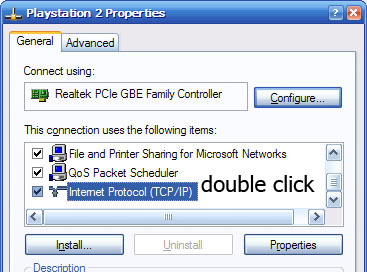
ေလးေတြထည့္ရေအာင္။ run - cmd အဲဒီထဲမွာ ncpa.cpl လုိ႕ရုိက္လုိက္ ဗ်ာ
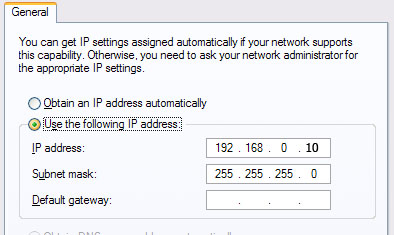
ျပီးရင္ ေအာက္ကပုံေတြကအတုိင္းလုပ္ စာရုိက္ရတာေညာင္းလာျပီဗ်။


                    ဒီအတုိင္းေတြ႕ရလိမ့္မယ္ဗ်
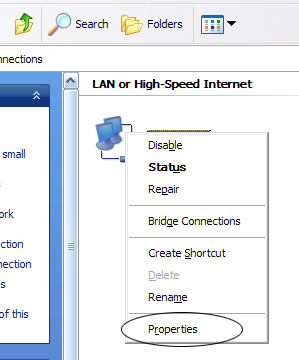


ဒီအတုိင္းေတြ႕ရလိမ့္မယ္


ကၽြန္ေတာ္က
ကြန္ပ်ဴတာ ip ကုိ 192.168.0.10 ထားတယ္ 192.168.0.? ေနာက္ဂဏန္းကုိေတာ့
ကုိၾကိဳက္တာထားေပါ့ဗ်ာ။ PS2 စက္ကုိဖြင့္ Aspireloader ကုိေရြး။ ျပီးရင္ ps2
စက္ထဲက network configure ထဲမွာလဲ PC IP နဲ႕ Gateway ေနရမွာ computer ip
နဲ႕တူေအာင္ထား ကြန္ပ်ဴတာ ip က 192.168.0.10 ဆုိ သူတုိ႕ကုိလဲ
အဲဒီအတုိင္းထားလုိက္ share ေဘးကနာမည္ကေတာ့ဂိမ္းေတြသြင္းထားတဲ့ GAME ဆုိတဲ့
နာမည္ကုိ႔႔ရုိက္လုိ္က္ အၾကီးအေသးလြဲလုိ႕မရဘူးေနာ္။ setting ထဲမွာလဲ ETH
တုိ႕ USB တုိ႕ကုိ manual ထားလုိက္ default က off ထားတာေလ default
ကဘာမွပါမွာမဟုတ္ဘူး manual ေျပာင္းမွ network game ေတြပါေတြေပၚလာမွာဗ်။
network game မွာ x ကုိႏုိပ္လုိက္ ဒါဆုိရင္ ကြန္ပ်ဴတာထဲမွာသြင္းထားတဲ့
ဂိမ္းေတြ အကုန္ေပၚလာျပီ ကုိယ္ၾကိဳက္တာကုိ
ၾကက္ေျခခတ္ႏုိပ္ျပီးေစာ့လုိ႕ရျပီဗ်။ 


ps2 စက္ေတြအမ်ားၾကီးကစားမယ္ဆုိရင္ ps2
စက္ရဲ႕ network config ထဲက PS2 ip ေနရာမွာ တစ္လုံးနဲ႕တစ္လုံး

မတူေအာင္ထားရမွာ
တူရင္ေတာ့ မရဘူး။ ဥပမာဗ်ာ တစ္လုံးက 192.168.0.1 ဆုိရင္ ေနာက္တစ္လုံးက
192.168.0.2 ေပါ့ pc ip နဲ႕ သြားတူလုိ႕မရဘူးေနာ္ PC ip က 192.168.0.10
ထားတာ သူနဲ႕လည္းသြားတူလုိ႕မရဘူး။ဒါဆုိကြန္ပ်ဴတာတစ္လုံးထဲကေန ps2
စက္ေတြအမ်ားၾကီး ခ်ိတ္ဆက္ကစားလုိ႕ရသြားျပီဗ်။ ကၽြန္ေတာ္ကwindow xp နဲ႕ ps2
စက္ ၁၀ လုံးခ်ိတ္တာအဆင္ေျပတယ္။အလုံး (၂၀) ေလာက္ခ်ိတ္ခ်င္ရင္ေတာ့ window7
မွရမယ္ဗ်။Game list ရဲ႕ေဘးမွာ သက္ဆုိင္ရာဂိမ္းေတြရဲ႕ပုံေတြထည့္လုိ႕ရတယ္ဗ်။
Theme
ေတြလဲကုိယ္ၾကိဳက္သလုိေျပာင္းလုိ႕ရတယ္အဲဒါေတြေတာ့ကၽြန္ေတာ္မေျပာေတာ့ဘူးဗ်ာ ဒီမွာ သြားၾကည့္လုိက္ၾကေတာ့.....။


လုိအပ္ေသာဖုိင္မ်ားကုိ ေအာက္ကလင့္မွာေဒါင္းယူပါ...


Download From Sky Drive


Mirror Link:

FreeMcBoot

OPLv0.8

SYS-CONF


အဆင္မေျမတာရွိရင္ ကၽြန္ေတာ့ဆီကုိ ေမးလ္ပုိ႕ျပီးေမးျမန္းႏုိင္ပါတယ္။  softlight82@gmail.com


Credit & Ref : http://aspireman.ucoz.net/



Tuesday, 20 August 2013

Dragon City Cheats & Hack Tool (Update In August 2013)

Unknown | 20.8.13 | Best Blogger Tips


 Facebook မွာ Game ကစားၾကတဲ႔ သူငယ္ခ်င္းေတြအတြက္ပါ... ေတာင္းထားလို႔ အားလံုးအတြက္ ျပန္လည္မွ်ေဝေပးလိုက္ပါတယ္...။


 Dragon City Cheats & Hack Tool (Update In August 2013)


Click Here to Download


Sunday, 4 August 2013

FIFA Manager 13 Full Version PC Game (Direct Link + ISO)

Unknown | 4.8.13 | | Best Blogger Tips


 PC အတြက္ FIFA Game ေလး ရွာေပးပါဆိုလို႔ အားလံုးအတြက္ တဆင့္ ျပန္လည္မွ်ေဝေပးလိုက္တယ္.....။


Description Of FIFA Manager 13 : The next game in the popular series of
footballmanagement simulator FIFA Manager, where you will find a host of
new features and improvements. As in previous games, you will take
control of football clubs and will practice all the basic aspects of its
activities. Will train the players to engage in transfer policy, the
development of the clubs


infrastructure, a healthy atmosphere in the team and many others. It is
worth noting that in the FIFA Manager 13 is much more attention paid to
the psyche of players, their motivations,the main objectives aimed at by
the players, and the relationship with other players.


Minimum System Requirements :

Operating System: Windows Xp/Vista/7

CPU: Intel Pentium 4, 2.4 GHz or AMD Sempron 2400+

RAM: 1 GB

Graphics: NVidia GeForce 6600 GT or AMD Radeon 9500

DirectX: DirectX 9.0


Recommended System Requirements :

Operating System: Windows Xp/Vista/7

CPU: Intel Pentium 4 2.8 GHz or AMD Athlon 64 2800+

RAM: 1.5 GB

Graphics: NVidia GeForce 6600 GT or AMD Radeon 9500 Pro

DirectX: DirectX 9.0 or later


Password (If Needed) : file.ge


Friday, 10 May 2013

ေဘာင္းဘီခၽြတ္တဲ့ဂိမ္း

Unknown | 10.5.13 | | | Best Blogger Tips


႐ိုင္းတာေတာ့မဟုတ္ပါဘူးဗ်ာ..
အေပ်ာ္ေပါ့.. ဂိမ္းနာမည္ကိုက Trouser Trouble ျဖစ္ပါတယ္.. ဒီဂိမ္းမွာ
အဆင့္အလိုက္ ခၽြတ္ရမယ့္လူ၊ မခၽြတ္ရမယ့္လူေတြကို အဆင့္မ၀င္ခင္
ေျပာျပေပးထားပါတယ္.. ၃ ခါေဖာင္းရင္ေတာ့ Game Over ျဖစ္သြားပါတယ္..
စိတ္၀င္စားဖို႔ေကာင္းသလို ေပ်ာ္စရာလည္းေကာင္းလို႔ပါ...


ေပ်ာ္ရႊင္ပါေစ


Download Links: 5.11 MB


Friday, 25 January 2013

Football Manger 2013 + Crack & Patch

Unknown | 25.1.13 | Best Blogger Tips


aung2:ေက်းဇူးၿပူၿပီးေတာ႔ Football Manager 2012 ရွိရင္ တင္ေပးပါလားအကို...


ဟုတ္ကဲ့ Football Manger 2013 ကိုပဲ တဆင့္ျပန္လည္မွ်ေဝေပးလိုက္ပါတယ္... က်ေနာ္ကေတာ့ မကစားပါဘူး... သူငယ္ခ်င္းေတြ လိုအပ္ေနတာေလးေတြကို လိုက္ျပီး  ျဖည့္ဆည္းေပးရံုသက္သက္ပါ... အဆင္ေျပပါေစ...:)


previous version of the game was the company's most popular and most popular games today its latest version of the game was released in many addictive and gamers are followed., you can not play the game of football but also managing and directing players to win the game you must complete management and intelligence to get you high Cup Bazyknantan have to guide.


Game system requirements:


OS : Windows Xp/Vista/W7/W8


CPU: XP: 1.6GHz or Faster. Vista/W7/W8: 2.2GHz or Faster


RAM: first GB RAM


Hard Disk Space: 2nd GB of free space


Video Card : Nvidia FX Ultra or greater five thousand nine hundred; 


ATI Radeon or greater the 9800th; Intel 82915G/82910Gl or greater.


DirectX ®: DirectX 9.0


Monday, 17 December 2012

Crysis 2 Repack For PC Game (3GB)

Unknown | 17.12.12 | | Best Blogger Tips


စက္ရုပ္ဆန္ဆန္ တိုက္ခုိက္ရတာေတြကို ၀ါသနာပါတဲ့သူမ်ားအတြက္ Game ေကာင္းတစ္ခုလို႕ေျပာလုိ႕ရပါတယ္။ ပီျပင္လွတဲ့ 3D Effects ေတြနဲ႕တိုက္ခုိက္ မႈေတြကို ျမိဳ႕ထဲမွာ.ေနရာေဒသအႏွံ႕ မွာဆင္ႏႊဲရမွာပါ..စိတ္၀င္စားသူမ်ား Download ယူႏိုင္ပါၿပီ။


System Requirements:

- Operating System: Microsoft ® XP / Vista

- Processor Pentium Core 2 Duo 2 GHz / Athlon 64 X2 2 GHz

- RAM: 2 GB of RAM (3 GB for Windows Vista)

- Video: level GeForce 8800 GT / Radeon HD 3850 with 512 MB memory

- Sound Card: Sound device compatible with DirectX ® 9.0

- Free hard disk space: 10.5 GB

- Tablet: enclosing


Turbobit ကေနတင္ေပးထားပါတယ္..Premium Account Generator သံုးၿပီး Download ရယူပါ။ သံုးနည္းကေတာ့ Turbobit ရဲ႕ Link ကို ဥပမာ - http://turbobit.net/jpcggbz34klz.html ကို Premium Account Generatorရဲ႕ အကြက္ထဲကို ကူးထည့္ၿပီး Generate ကိုႏွိပ္ပါ..Download Link တစ္ခုခ်ေပးပါလိမ့္မယ္..အဲဒါကိုဖြင့္ၿပီး ျမန္ျမန္ ဆန္ဆန္နဲ႕ Download ခ်ႏိုင္ပါၿပီခင္ဗ်ာ။


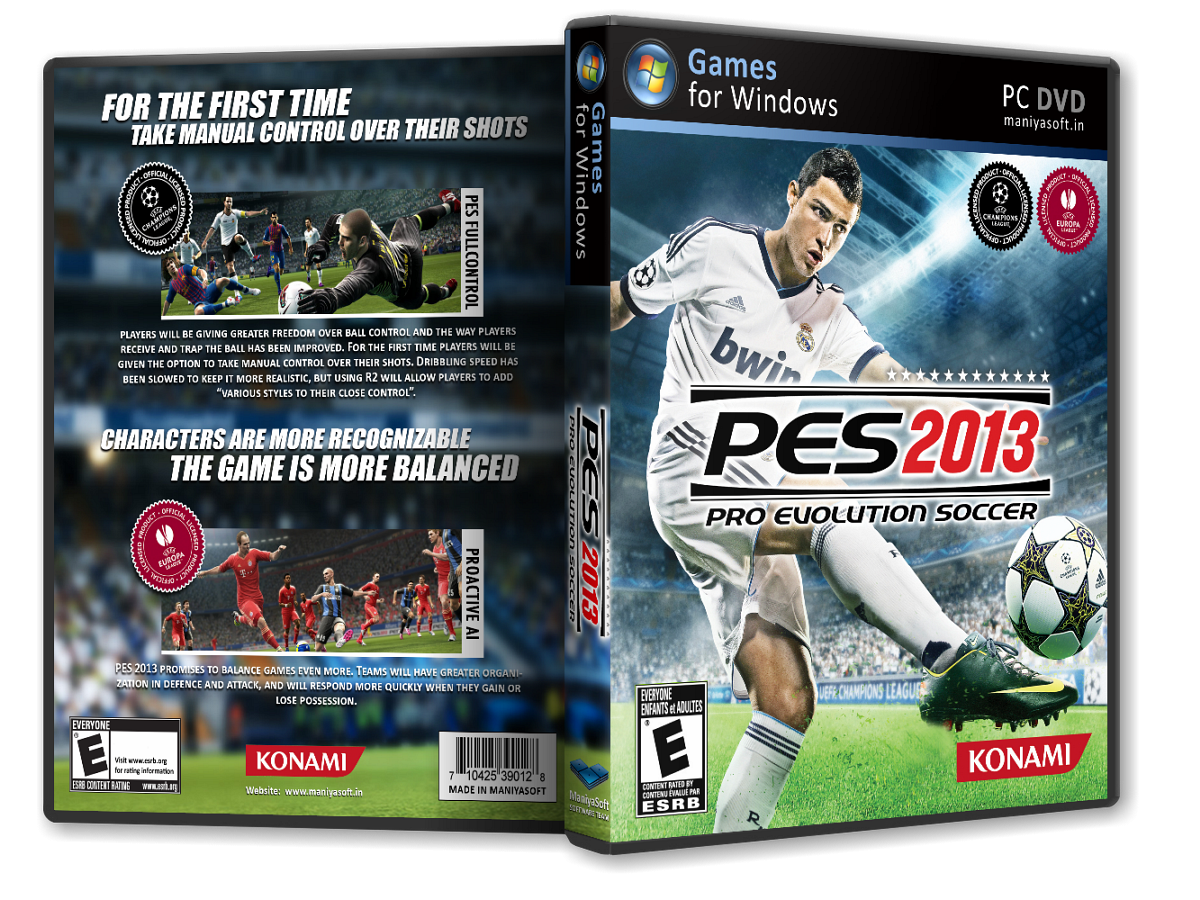
Pro Evolution Soccer 2013 For PC (4GB) တိုက္ရိုက္ေဒါင္းဖုိ႕အတြက္ ျပန္ျပင္ေပးထားပါတယ္

Unknown | 17.12.12 | | Best Blogger Tips


ေဘာလံုးဂိမ္းၾကိဳက္ႏွစ္သက္သူ ညီအစ္ကိုမ်ားအတြက္ Pro Evolution Soccer 2013 တင္ေပးလုိက္ပါတယ္။ အပိုင္း ၇ ပိုင္းပိုင္းၿပီးတင္ထားေပးပါတယ္..တစ္ပိုင္းခ်င္းကို စိတ္ရွည္လက္ရွည္သာေဒါင္းပါ..။ Connection ေကာင္းတဲ့ ေန၇ာမ်ိဳးေတြကေတာ့ အဆင္ေျပမွာပါ..Download ရယူႏိုင္ပါၿပီ။


<< Download Here>>


Rar Passwords:  www.oxava.com  


Internet Download Manager နဲ႕ေဒါင္းပါ..Download Link ေတြကို တစ္ခ်က္ကလစ္လိုက္တာနဲ႕ တန္းေဒါင္းပါတယ္။  


Far Cry 3 For PC Games (Download Direct Link) 10GB

Unknown | 17.12.12 | | Best Blogger Tips


က်ေနာ့္ Email ထဲကို ပို႕ၿပီးေတာင္းဆိုေနတာ ၉ ၾကိမ္တိတိရွိပါၿပီ..တစ္ျခားေတာ့ မဟုတ္ပါဘူး Game ေကာင္းေကာင္းေတြ တင္ေပးဖို႕ပါဘဲ..ေတာင္းဆိုထားတဲ့ သူေတြကလဲ ျမန္မာျပည္က မဟုတ္ၾကပါဘူး.. မေလး..အင္ဒို..ထိုင္း...USA စတဲ့ႏိုင္ငံေတြက မ်ားပါတယ္..ကၽြန္ေတာ္ သူတို႕ကို ေမးၾကည့္ပါတယ္..ဂိမ္းေခြေတြက ၀ယ္မရဘူးလားဆိုေတာ့ မေလးက အစ္ကိုတစ္ေယာက္က ျပန္ေျဖပါတယ္..ဂိမ္းေခြတစ္ေခြကို အနည္းဆုံး ျမန္မာေငြနဲ႕ဆိုရင္ ၈၀၀၀ ရွိပါသတဲ့..ဒီပမာဏဟာ က်ေနာ္တို႕ျမန္မာႏိုင္ငံအတြက္ အင္မတန္မွကိုမ်ားလြန္းေနပါတယ္..ျမန္မာမာဆိုရင္ အလြန္ဆံုးရွိမွ သံုးေထာင္ေလာက္ေပါ့..သူတို႕ဆီမယ္


Windows တစ္ခါတင္ရင္ အနည္းဆံုး သံုးေသာင္းနီးပါးေလာက္ ရွိပါသတဲ့..ကဲ...က်ေနာ္တို႕ျမန္မာေတြဗ်ာ..အဆင္မေျပလို႕သာ ျပည္ပထြက္ၿပီးအလုပ္လုပ္ေနရတယ္..သူမ်ား


ႏိုင္ငံမွာဗ်ာ..ကြန္ပ်ဴတာတစ္ခုခုျဖစ္တိုင္း မလုပ္တတ္လို႕ မတန္မဆေတြေပးေနရတယ္...ဒါေၾကာင့္ ျပည္ပေရာက္ျမန္မာေတြ အကူအညီလိုရင္ ေျပာၾကပါ..က်ေနာ္တို႕ ကူညီဖို႕အသင့္ရွိေနတယ္..ျမန္မာအခ်င္းခ်င္းတကယ္ကိုယ္ခ်င္းစာတယ္ဗ်ာ..တစ္ခုခုလိုအပ္တာရွိရင္လဲ Mailserver.npt@gmail.com ကိုဆက္သြယ္ပါ။ ကြန္ပ်ဴတာ system ပိုင္းဆိုင္ရာ ခ်ိဳ႕ယြင္းေနရင္လဲ ျမန္မာျပည္ကေန တစ္ဆင့္ TeamViewer နဲ႕လွမ္းျပင္ေပးပါ့မယ္ ဗ်ာ..လိုအပ္မယ္ ဆိုရင္ ဒီမွာ ေဒါင္းသြားၾကပါ။ အခု ျပည္ပက ညီအစ္ကိုေတြ ေတာင္းဆိုထားတဲ့ ဂိမ္းေတြကိုလည္း..တင္ေပးမယ္ဗ်ာ..လက္လွမ္းမီွသေလာက္ကို ရွာေဖြၿပီးတင္ေပးသြားမယ္..ျပည္ပကဆိုေတာ့ အင္တာနက္အဖိုးႏႈန္းလဲ သက္သာတယ္.ျမန္လဲျမန္တယ္ဆိုေတာ့ ေဒါင္းရတာ အဆင္ေျပၾကမယ္လို႕ထင္ပါတယ္..အပိုင္းေလးေတြနဲ႕ခြဲတင္ေပးထားတယ္..ေအးေအးေဆးေဆးေဒါင္းေပါ။


ကဲ.. အခုဂိမ္းက အပိုင္း ၁၅ ပိုင္းခြဲတင္ေပးထားပါတယ္။ စုစုေပါင္း 10GB ရွိပါတယ္။ တစ္ပိုင္းခ်င္းစီေဒါင္းပါ။


Download Part 4                Part 9             Part 14


Download Part 5                Part 10           Part 15


Files Passwords: www.oxava.com 


Download ျပဳလုပ္လို႕ရလာတဲ့ ဖိုင္ေတြကို Folder တစ္ခုအတြင္းသို႕ Extract လုပ္ပါ.ၿပီးမွ Install လုပ္ပါ။