Showing posts with label window 7. Show all posts

Monday, 23 September 2013

Windows 7 Manager 22/09/2013

Unknown | 23.9.13 | Best Blogger Tips


Windows 7 Manager ကိုသင္သံုးဘူးပါသလား...? သံုးေနတဲ ့သူငယ္ခ်င္းေတြအတြက္ေတာ ့ 22/09/2013 ေနာက္ဆံုးထြက္ေလးမို ့အခ်ိန္မွိီတင္ေပးလိုက္ပါတယ္ ။မသံုးဘူးတဲ ့သူငယ္ခ်င္းေတြအတြက္ကေတာ ့(ဖတ္ေပးပါ)ခင္ဗ်ာ


Windows 7 အသံုးျပဳတဲ့သူငယ္ခ်င္းတိုင္းအတြက္ေဆာင္ထားရမဲ ့ ေဆာစ့္၀ဲလ္ေလးပါ

ဖိုင္ဆိုဒ္(
13 ) mb ထဲပဲရိွပါတယ္။ဒီေကာင္ေလးကFeatures အခ်ဳိ႕နဲ ့System ေတြနဲ႔
hardware information
ေတြကိုလည္းအေသးစိတ္ကအစ ၾကည္႔ရွဴနုိင္ျခင္း ၊မိမိတို႔စက္ထဲမွာရွိတဲ႔ running
processes နဲ႔ threads ေတြရဲ႕ အခ်က္အ လက္ေတြ
ကိုလည္းအေသးစိတ္ၾကည္႔ႏုိင္ျခင္း၊Windows 7 Manager မွာ 1-clicking
လုပ္လိုက္တာနဲ ့စက္ကိုအလိုေလ်ွာက္ေပါ ့ပါးရွင္းလင္းေပးျခင္း။( cleans
system automatically )လည္းပါဝင္ျခင္းဝင္းဒိုးရဲ ့ အပိတ္အဖြင္ ့နဲ
့စတင္ျခင္းကိုျမန္ဆန္ေအာင္လုပ္ေပးျခင္း(၊windows startup and shutdown
speed)
ကိုလည္း တိုးျမွင္႔ေပးႏုိင္ျခင္း၊ hardware ေတြရဲ႕ system speed နဲ႕
performance ေတြကိုလည္း တိုးျမွင္႔ေပးႏုိင္ျခင္း၊မ လိုအပ္တဲ႔
system tasks ေတြကိုလည္း Turn off လုပ္ေပးႏုိင္ျခင္း၊ Registry Cleaner
ကလည္း မိမိတို႔ရဲ႕ incorrectly linked registry entries
အလိုအေလ်ာက္ဖယ္ရွားေပးျခင္း နဲ႔စတဲ႔ Features
ေလးေတြေတာ္ေတာ္မ်ားမ်ားကိုပါဝင္ပါတယ္။ကဲေဆာင္ထားလိုက္ပါေတာ ့ခင္ဗ်ာ။.


အသံုးဝင္ေဆာ ့ဝဲေလးေတြအသစ္တင္တိုင္း facebook ကေနေစာင္ ့ဖတ္မယ္ဆိုရင္


ဒီမွာ like လုပ္ေပးပါ။



Saturday, 7 September 2013

Windows 7 Logon Changer

Unknown | 7.9.13 | Best Blogger Tips


မဂၤလာပါ ဗ်ာ အခု ေပးခ်င္တာေလးကေတာ႕ Windows 7 Logon Changer ဆုိတဲ႕ ေကာင္ေလးပါ သိၿပီးသားသူငယ္ခ်င္းမ်ားကေတာ႕ေၿပာစရာမလုိေလာက္ဘူးထင္ပါတယ္  ကၽြန္ေတာ္တုိ႕ လုိသာမာန္ user ေတြ အတြက္က သစ္ဆန္းတဲ႕ ဒီဇုိင္းေတြလုိ႕ေတာင္ေၿပာလုိ႕ ကုိ ၾကိဳက္နွစ္ သက္တဲ႕ Windows 7 Logon  ေတြ ေၿပာင္းလုိ႕ရပါတယ္ အသုံးၿပဳနည္းကလဲ အရမ္းကုိ ရုိးရွင္းပါ change logo screen ဆုိတဲ႕ေနရာေလးကုိ ကလစ္နွိပ္႔ၿပီး ကုိယ္နွစ္တဲ႕ photo ေတြ ခ်ိန္းလုိ႕ပါတယ္ၿပီးရင္ restart ခ် လုိက္ပါ  window ၿပန္တက္တဲ႕ အခ်ိန္ၾကရင္ သူငယ္ခ်င္းတုိ႕ ေရြးခ်ယ္ထားတဲ႕ logon ပုံ စံ ေလးနဲ႕ တက္လာပါလိမ္႕မယ္ အဆင္ေၿပပါေစဗ်ာ  <br />မရွင္းတာရွိရင္ေမးနုိင္ပါတယ္ခင္မ်ာ ၾကိဳကိနွစ္သက္တယ္ဆုိေဒါင္းေပါ႔ေနာ္ https://app.box.com/s/m2wwdnxqtr3960p3erj8<br />=================================================<br />Choose the folder of you picture and press apply Restart your computer ,it show as your logon screen


ဒီ Post ေလးအေၾကာင္းမေျပာခင္မွာေတာ့ ဒီ Post ေလးကိုမူရင္းေရးသားသူ ျဖစ္တဲ႕AC Vs DC ကိုအရင္ဆံုး Creidt ေပးခ်င္ပါတယ္။ သူ႕ရဲ႕ ေစတနာနဲ႕ ပညာကိုေလးစားတဲ႕အေနနဲ႕ Credit ေပးတာပါ။


မဂၤလာပါ
ဗ်ာ အခု ေပးခ်င္တာေလးကေတာ႕ Windows 7 Logon Changer ဆုိတဲ႕ ေကာင္ေလးပါ
သိၿပီးသားသူငယ္ခ်င္းမ်ားကေတာ႕ေၿပာစရာမလုိေလာက္ဘူးထင္ပါတယ္ ကၽြန္ေတာ္တုိ႕
လုိသာမာန္ user ေတြ အတြက္က သစ္ဆန္းတဲ႕ ဒီဇုိင္းေတြလုိ႕ေတာင္ေၿပာလုိ႕ ကုိ
ၾကိဳက္နွစ္ သက္တဲ႕ Windows 7 Logon ေတြ ေၿပာင္းလုိ႕ရပါတယ္ အသုံးၿပဳနည္းကလဲ
အရမ္းကုိ ရုိးရွင္းပါ change logo screen ဆုိတဲ႕ေနရာေလးကုိ ကလစ္နွိပ္႔ၿပီး
ကုိယ္နွစ္တဲ႕ photo ေတြ ခ်ိန္းလုိ႕ပါတယ္ၿပီးရင္ restart ခ် လုိက္ပါ window
ၿပန္တက္တဲ႕ အခ်ိန္ၾကရင္ သူငယ္ခ်င္းတုိ႕ ေရြးခ်ယ္ထားတဲ႕ logon ပုံ စံ ေလးနဲ႕
တက္လာပါလိမ္႕မယ္ အဆင္ေၿပပါေစဗ်ာ။မရွင္းတာရွိရင္ေမးနုိင္ပါတယ္ခင္မ်ာ
ၾကိဳကိနွစ္သက္တယ္ဆုိေဒါင္းေပါ႔ေနာ္


**  Step-1.ေအာက္က Download Button ကိုႏွိပ္လိုက္ပါ  


**  Step-2. "5sec". ေလာက္ေစာင္႕ေပးပါ။


**  Step-3. "  << SKIP AD >>   ".ကိုႏွိပ္ေပးပါ။


**  Step-4. Download Link က်လာပါလိမ္႕မယ္။


**  အဆင္ေျပပါေစဗ်ာ။


Wednesday, 7 August 2013

Quick Format ႏွင္႕ Regular Format ဘာကြာလဲ

Unknown | 7.8.13 | | Best Blogger Tips


Quick Format ႏွင္႕ Regular Format ဘာကြာလဲ
============================


ကၽြန္ေတာ္တိုိ႕ Windows တင္တဲ႕ အခါမွာFormat အတြက္ ေရႊးခ်ယ္ရတဲ႕ Quick
ႏွင္႕ Regular ဆုိျပီး ရွိပါတယ္။ Quick ႏွင္႕ တင္ရင္ ဘယ္လိုျဖစ္ မယ္
Regular နဲ႕ တင္ရင္ ဘယ္လိုျဖစ္မယ္ဆုိတာ ကုိ သိျပီးတင္တာနဲ႕ ဒီအတုိင္း
တင္ေနတာထပ္စားရင္ အဓိပၸာယ္ပုိရွိမွာပါ။ ဒါေၾကာင္႕ အခုလုိ တင္ျပ ေပးလုိက္တာ
ျဖစ္ပါတယ္။

ကၽြန္ေတာ္တုိ႕
Windows တင္တဲ႕အခါမွာ ေအာက္ပါအတုိင္းေတြ႕ရပါတယ္။ တစ္ခ်ဴိ႕ Windows ေတြမွာ
FAT File System မပါရွိေတာ႕ပါဘူး NTFS File System ကုိဘဲ
ပါပါေတာ႕တယ္။ေနာက္ျပီး no Changes လဲ ပါမလာတာေတြ ရွိပါတယ္။ အဲဒါက
အေရးမၾကီးပါဘူး။ Quick Format ႏွင္႕ Regular Format ကုိ နားလည္ဖို႕ဘဲ
လုိပါတယ္။ NTFS ႏွင္႕ FAT အေၾကာင္း တင္ျပခဲ႕ျပီးျဖစ္ပါတယ္။

Format the partition by using the NTFS file system (Quick)
Format the partition by using the FAT file system (Quick)
Format the partition by using the NTFS file system
Format the partition by using the FAT file system
Leave the current file system intact (no changes)
Quick Format

ကၽြန္ေတာ္တုိ႕ Quick Format နဲ႔ တင္တဲ႕ အခါမွာ Windows တင္တဲ႕ အပုိင္းက
Disk ထဲက File ေတြကုိ ဖယ္ရွား (Remove) ေပးပါတယ္။ ဒါေပမဲ႕ Drive ရဲ႕ bad
Sectors ေတြကုိ Scans မလုပ္ေပးပါဘူး။ တစ္နည္းအားျဖင္႕ Bad Sectors
ရွိရဲ႕သာနဲ႕ bad Sectors ကုိ Scan မလုပ္ဘဲ ေကာင္း တဲ႕ေနရာမွာဘဲ
တင္သြားခဲ႕မည္ဆုိလ်င္ Drive က မပ်က္စီးဘူးလုိ႕ ထင္ျပီး Quick Format ဘဲ
ေရြးခ်ယ္သင္႕သလား။ ကုိယ္တုိင္း စဥ္းစားပါ။ ဒါေၾကာင္႕ Quick Format က
Windows တင္တာ ျမန္ေပးမဲ႕ bad Sectors ေတြကုိ Scan မလုပ္တာ
ျဖစ္တဲ႕အတြက္ေၾကာင္႕ မိမိ Drive မွာ Bad Sectors ရွိရဲ႕သာနဲ႕ မစစ္ေဆးဘဲ
Quick Format နဲ႕ဘဲ တင္ေနမယ္ဆုိရင္ Hard Disk က ေရရွည္ခံႏုိင္ရည္ ရွိမရွိ
စဥ္းစားသင္႕ပါတယ္။ Disk Error ေရွာင္းရွား ႏုိင္သလာ ကုိယ္တုိင္း စဥ္းစားပါ။


Ref ; Cristiano Zarni


ALEX


Wednesday, 24 July 2013

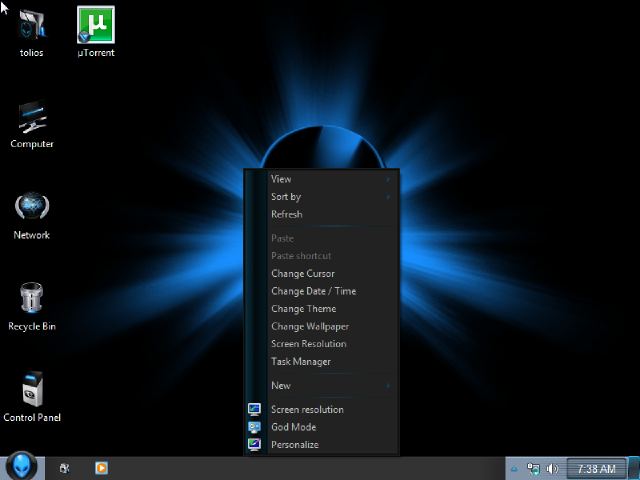
Windows 7 Alienware Blue Edition (x64/Eng/Jul2013) (3.9 GB)

Unknown | 24.7.13 | Best Blogger Tips


ကြန္ပ်ဴတာမွာ
Window အလန္းစားေတြကိုမွ အသံုးျပဳခ်င္တဲ့ သူငယ္ခ်င္းမ်ားအတြက္ Windows 7
Alienware Blue Edition (x64/Eng/Jul2013) တင္ေပးလိုက္ပါတယ္။ 64 Bit
Edition ျဖစ္ပါတယ္။ 32 Bit Edition ေတြ႕ရင္ ထပ္တင္ေပးသြားပါ့မယ္။
အသစ္အဆန္းေတြကိုမွ အသံုးျပဳတတ္တဲ့ သူငယ္ခ်င္းမ်ားအႀကိဳက္ျဖစ္မွာပါ။
ပါ၀င္တဲ့ Features ေတြကိုေတာ့ ေအာက္မွာၾကည့္ေပးပါ။ Resume
လည္းရပါတယ္ခင္ဗ်ာ။ စမ္းသပ္သံုးစြဲလိုသူမ်ား ေဒါင္းလုပ္ရယူႏိုင္ပါၿပီ။


Control panel

Windows Side Show=Remove
Ease Of Access=Remove
Phone and Modem=Remove
Tablet PC Setting=Remove
Control panel view=Category

[Control Panel Add]

Registry=Add
Group Policy=Add
User Directory=Add

Desktop Add/removed:

Show Hidden Wallpapers and Themes=Enable
Application TimeOut=3000
Wait to Kill Application TimeOut=5000
Show Desktop Icons=Enable

Desktop Taskbar:

Show run on start menu=Enable
Use small icons=Enable

Explorer shortcuts:enablesAdministrative Tools=Enable
Device Manager=Enable

Explorer Context:EnableSAdd Device Manager=Enable
Add Group Policy=Enable
Add MS-Config=Enable
Add Services=Enable
God Mode=Enable
Registry Editor=Enable
Change Cursor=Enable
Change Theme=Enable
Change Wallpaper=Enable
God Mode=Enable
Task Manager=Enable
Copy To=Enable
Move To=Enable
Grant Admin Permission=Enable
Open With Notepad=Enable

Explorer Views:Enabled/Disabled

Show Hidden Files and Folders=Enable
hide Drives with No Media=Disable

Security:enabled/Disabled

Anti spyware=Enable
UAC=Default
Windows Firewall=Enable

System Changes or disable/Enables

UXTheme patch=Enable
Command Window Background Colour=Blue
Command Window Text Colour=Green
Set Mouse Pointer Speed Maximum=Enable
Hibernation=Disable
Low disk space warning=Disable

Visual Effects:Enabled/DisableTransparent Glass=Enable
Aero snap=Disable

Internet Explorer:

Default Search Page=www.google.com

19:Addons Added:
list here:

DaRkMaDnEsS_IDM5.18Build4
DTPro5.3.0.0359_Intl(need download STPD 1.83)
7Zip9.30
Auslogics.Registry.Defrag.6.5.1.0
Autoruns.11.50.x64
CCleaner.4.01.4093
ClipName.1.3.0
Defraggler.2.12.628
Gimp.2.8.4.
HashCheck.2.1.11.1
ImgBurn.2.5.7.0
Mozilla.Thunderbird.11.0.1
VLC.Media.Player.2.0.6.0
Waterfox.18.0.1
WinRar.4.20.x64
AutoIt_3.3.6.1
Partition_Wizard_Home_Edition_7.0.0.1
SnakeCracker's_BumpTop_1.11
uTorrent 2.0

News of personalize:

New Theme
New wallpapers
New Icon pack
Cursors:Same
Windows sounds
New log on /log off Wallpapers and rolation orb
New Start Orbs


Download=>> Link 1, Link 2 


Sunday, 21 July 2013

စက္ရဲ႕ Mouse Cursor ေတြကို စိတ္ၾကိဳက္ေျပာင္းလဲေပးႏိုင္မယ့္ CursorFX v2.11 For Win XP & Win7

Unknown | 21.7.13 | | | Best Blogger Tips


ကိုယ့္စက္ရဲ႕ Cursor အေဟာင္းၾကီးကို အသစ္လဲခ်င္သူေတြ အတြက္ပါ..

ပထမ C-pannel ထဲက ေျပာင္းနည္းကို  တင္ေပးဖူးပါတယ္..

အဲ့ဒါကနည္းနည္း အလုပ္ရွုပ္တာေၾကာင့္ ဒီ Software ကုိတင္ေပးလိုက္တာပါ..

အသံုးျပဳတာကလည္း လြယ္ကူပါတယ္...

အေသးစိတ္ကို မူရင္းဆိုက္မွာေလ့လာႏိုင္ပါတယ္ .. >>HERE

အသံုးျပဳခ်င္တယ္ဆိုရင္ေတာ့ Download ဆြဲလိုက္ပါ..

14 MB ေက်ာ္ေက်ာ္ပဲရွိပါတယ္..

အဆင္ေျပပါေစခင္ဗ်.  :)


Download From Mediafire   >>>>DOWNLOAD


Download Form Zippyshare >>>>DOWNLOAD


Download From DropBox    >>>>DOWNLOAD


Download From DatafileHost >>>DOWNLOAD


 Post By: Einstein Kelvin


အေပၚက Link ေတြမွာ Full Version အတြက္ Crack မပါရင္ ဒီေအာက္က Link မွာ ေဒါင္းယူၾကပါ.... ဆင္ေျပၾကပါေစ....


Update Upload Link 21 July 2013 ... 1:45am


Click Here to Download


Wednesday, 6 March 2013

Window 7 MAC Address Changer v1.9.5

Unknown | 6.3.13 | | | Best Blogger Tips


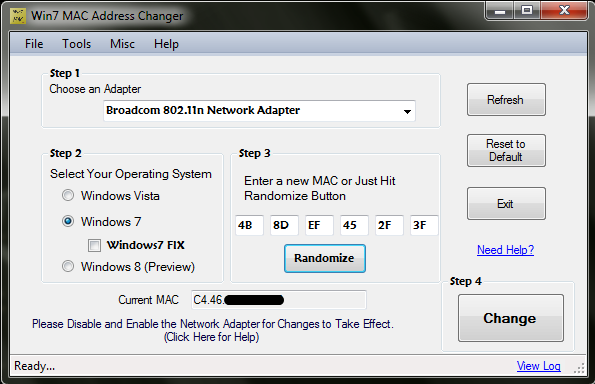
Win7 MAC Address Changer


maosheng: window 7 mac address changer ေလးရရွိရင္အသစ္တင္ေပးပါအံုးခင္ဗ်ာ....


ဒါေလးကေတာ့ သိတဲ့လူေတြ သိၾကမွာပါ... (တေနရာရာမွာ) မိမိတို႔ ကြန္ပ်ဴတာရဲ႕ IP ( MAC Address ) ကို Block ထားရင္ ဒီ Software ေလးနဲ႔ အလြယ္တကူ ျပန္ေျပာင္းႏိုင္ပါတယ္...။ 


Win7 MAC Address changer is a simple freeware windows program which can change the MAC (Media Access Control) Address of wired and wireless network adapters (Not routers). Win7 MAC Address Changer was developed to be a very simple utility. It’s usage is straightforward  just select the network adapter (virtual and loopback adapters are not show as it is not need), select your operating system, enter or generate MAC Address and just hit the change button, it is that simple! There are practically many uses of changing the mac address (physical address) such as troubleshooting network problems, software and hardware components, to hide the your identity in a network or just for fun!


Win7 MAC Address Changer is capable of spoofing MAC Address in all major windows systems including Windows Vista and Windows 7, Windows 8  (both 32bit and 64bit systems).


Click Here to Download


Tuesday, 29 January 2013

XUS Launcher Professional Edition 2.2.0 Full (Desktop ေပၚက Icon ေလးေတြကို အလွဆင္ခ်င္ရင္)

Unknown | 29.1.13 | | Best Blogger Tips


Desktop ေပၚက Icon ေလးေတြကို အပၚကပံုအတိုင္း အလွဆင္ဖို႔ပါ.... 


XUS Launcher Professional Edition 2.2.0 Full Keygen | 3 MB


XUS Launcher Pro Edition 2.2.0 Full Version - XUS Launcher merupakan sebuah software kecil yang berguna untuk merapikan shortcut-shortcut icon program yang berada di layar desktop pc anda sehingga tampilan desktop akan jauh terlihat lebih rapi dan lebih menarik. XUS Launcher Professional Edition sangat ringan dan tidak boros dalam penggunaan memory, sehingga tidak tidak akan mengganggu performa pc anda.


Features


Fast & Flexible way to launch your frequent program.


Another way to organize your windows desktop icons.


Keyboard shortcuts help you saving time.


Make your Windows desktop clear and beautiful.


More useful and helpful functions.


Have 8 built-in groups & most-used programs.


Let you fast to access your Windows system directories & Windows accessories.


Click Here to Download


Saturday, 19 January 2013

ဝင္းဒိုး 7 တင္နည္း (ဝင္းဒိုးတင္နည္း)

Unknown | 19.1.13 | | Best Blogger Tips


ဒီေန႔ေတာ့ဝင္းဒိုး 7 တင္နည္းေလးကိုျပန္လည္မွ်ေဝေပးပါမယ္။အဲ...ဝင္းဒိုး 8 ကလဲအတူတူပဲေနာ္။

 7 တင္နည္းကိုသိရင္ 8 လဲတင္လို႔ရၿပီ သိလား.....ဝင္းဒိုးတင္နည္းကိုေတာ့

ဘေလာ့ေတာ္ေတာ္မ်ားမ်ားမွာတင္တာေတြ႕ဖူးပါတယ္ဒီဆိုဒ္ထဲမွာေတာ့ အရင္ကတင္ေပးဖူးပါတယ္..။

အခု PDF အေနနဲ႔ထပ္တင္ေပးလိုက္ပါတယ္

  ဟီးဟီး...တင္တက္တဲ့လူေတြက်ေေတာ့  က်ေနာ္ကိုမရယ္ၾကပါနဲ႔ေနာ္.. အခုမွကြန္ျပဴတာစ,သံုးမယ့္ ေဘာ္ဒါေတြနဲ႔ ဝင္းဒိုး တင္နည္းမသိေသးတဲ့ေဘာ္ေဘာ္ေတြအတြက္ရည္ရြယ္ပါတယ္ ခင္ဗ်ာ... သိသေလာက္ေလးကုိမွ်ေဝေပးတာပါလိုအပ္တာေလးမ်ားရွိခဲ့ရင္  အျပဳသေဘာေဆာင္တဲ့ ေဝဖန္မႈမ်ဳိးကိုႀကိဳဆိုပါတယ္ ... ေက်းဇူးအရမ္းတင္ေနမွာပါ။ေလေၾကာရွည္ေနတာနဲ႔

ဒီေန႔ဝင္ဒိုးတင္ရမွာဟုတ္ေတာ့ဘူး....ကဲ..ကဲစ,မယ္ေဘာ္ဒါတို႔

ပုဆိုးကေတာင္းႀကိဳက္လိုက္ေတာ့ ..ဟီးဟီး..နဲနဲေလးေနတယ္ Window က..

၃ ေယာက္ေလာက္မွရမယ္နဲ႔တူတယ္...ဟိဟိ


  က်ေနာ္က ဒီမွာ ဝင္းဒိုး တင္နည္းကို PDF ေလးနဲ႔လုပ္ထားတယ္ေအာက္မွာေဒါင္းယူၿပီးဖတ္ၾကည့္ပါေနာ္


Window 7 တင္နည္းေဒါင္းရန္ (PDF)


SHAREBEAST ကေနလဲေဒါင္းႏိူင္ပါတယ္ 


zippyshare ကေနလဲထပ္တင္ေပးလိုက္ပါတယ္


အဆင္မေျပဘူးေျပာလို႔ sharebeast & zippyshare ကို ထပ္တင္ေပးလိုက္ပါတယ္


Window 7 loader ေလးကို  ဒီမွာ ယူ ဒီမွာ လည္းယူႏိူင္ပါတယ္..


အားလံုးပဲ ဒီနည္းေလးအတိုင္းအသံုးျပဳရင္းေပ်ာ္ရႊင္ႏိူင္ပါေစဗ်ာ...


လိုအပ္လို႔အဆင္မေျပတာရွိရင္ျပန္ေအာ္ေပးခဲ့ပါ..  တခါတေလမအားလို႔ျပန္မေျပာႏိူင္ရင္လည္း


စိတ္မဆိုးၾကပါနဲ႔ တိုင္းတပါးမွာအလုပ္လုပ္ေနရတာဆိုေတာ့ အားတဲ့အခ်ိန္မွ က်ေနာ္တို႔ကတင္ေပးႏိူင္မွာမို႔ပါ။


အဆင္မေျပေသးရင္ ေအာက္က Video ေလးကို ၾကည့္ျပီး လုပ္ေပးႏိုင္ပါတယ္....:)


အားလံုးပဲ အဆင္ေျပႏိူင္ၾကပါေစဗ်ာ


ကိုလတ္(ကြ်ဲဆင္း)