Showing posts with label IOS APP မ်ား. Show all posts

Thursday, 17 July 2014

HTML5-Myanmar ( Developed By Saturngod )

မိုးညိုသား | 17.7.14 | Best Blogger Tips


မဂၤလာပါ ဒါကေတာ့ iOS သမားေတြအတြက္ ကိုေစတန္ ေရးသားၿပီး ထုတ္ထားတဲ့ HTML5-Myanmar app ပါ။HTMLအေၾကာင္း ျပည့္ၿပည့္စံုစံု ေရးသားေပးတဲ့အတြက္ ေဒါင္းယူၿပီးေတာ့ ေလ့လာေစခ်င္ပါတယ္..
ဒီ app ကိုအခမဲ့ျပဳလုပ္ေပးတဲ့ ကိုေစတန္ကို အထူးပဲေက်းဇူးတင္ပါတယ္။ app ကို iTunes မွတိုက္ရိုက္ ေဒါင္းလုတ္ရယူပါ။ App Store တြင္  HTML5-Myanmar လို႔ရိုက္ၿပီးေတာ့ ရွာလိုက္ပါ

ေအာက္ပါလင့္မွာလည္း ဝင္ေရာက္ၾကည့္ႏိုင္ပါတယ္
 https://itunes.apple.com/sg/app/html5-myanmar/id896736229?mt=8


Credit To => Saturngod


Monday, 31 March 2014

IOS မွာ Facebook ေပၚက Video ေတြကိုအလြယ္ေဒါင္းမယ္

မိုးညိုသား | 31.3.14 | Best Blogger Tips


မဂၤလာပါ iOS မွာ facebook ကေန Video clip ေတြေဒါင္းခ်င္လို႔ပါ ဘယ္လိုေဒါင္းရမလဲလို႔ ခဏခဏ ေမးေနတဲ့သူေတြအတြက္ပါ .. သိသူေက်ာ္သြားေပါ့ေနာ္. မသိေသးေသာသူေတြအတြက္

Apple Store မွာ ေအာက္ကပံုက app ကိုေဒါင္းလိုက္ပါ


 ၿပီးရင္ ဖြင့္ၿပီးေတာ့ Facebook Login ဝင္လိုက္ပါ


မိမိ Facebook မွာရွိေနသမွ် Video ေတြအကုန္ေပၚလာပါလိမ့္မယ္
ေပၚလာၿပီဆိုရင္ ေဒါင္းခ်င္တဲ့ Video ရဲ႕ေဘးမွာ Download Button
အျပာေရာင္ေလးရွိပါတယ္ ႏွိပ္ၿပီးေတာ့ ေဒါင္းလိုက္ပါ။


ၿပီးသြားရင္ေတာ့ Downloads ဆိုတဲ့ေနရာကို ဝင္လိုက္ပါ ေစာေစာေဒါင္းခဲ့တဲ့ Video ကိုေတြ႔ရမွာျဖစ္ပါတယ္..


 App Store ေဒါင္းဖို႔အဆင္မေျပသူမ်ား ေအာက္ကလင့္ကေနယူႏိုင္ပါတယ္

DOWNLOAD HERE

အားလံုးအဆင္ေျပၾကပါေစ.. အဆင္မေျပတာရွိရင္လည္း ေျပာခဲ့ပါ။


Friday, 10 January 2014

PPTV တြင္ အရည္ေသြးျမင့္ VIP movies မ်ားကို ၾကည့္ရႈနည္း

Unknown | 10.1.14 | Best Blogger Tips


႐ုပ္ရွင္ႏွစ္သက္သူတိုင္း အတြက္ ေနာက္ဆံုးထြက္ ႐ုပ္ရွင္မ်ားအျပင္ တီဗီစီးရီးမ်ားကိုပါ ၾကည့္႐ႈႏိုင္ေအာင္ ျပသေပးေနတဲ့ တ႐ုပ္ application တစ္ခုျဖစ္ေသာ PPTV App ေလးကို ရင္ႏွီးၿပီသား ျဖစ္ၾကပါလိမ့္မယ္။ 

AppStore မွာ "Free" အေနႏွင့္ ရယူႏိုင္ၿပီး ပံုမွန္အားျဖင့္ ႐ုပ္ရွင္ ေတာ္ေတာ္မ်ားမ်ားကို Free ၾကည့္႐ႈႏိုင္ပါတယ္။ အရည္အေသြးျမင့္ HD, Blu-ray ဇာတ္ကားမ်ား၊ ကမၻာေက်ာ္ပုဂၢိဳလ္မ်ား၏ Documentary မ်ား၊ နည္းပညာ သင္ခန္းစာမ်ား ကိုေတာ့ "VIP" section အျဖစ္ ခြဲျခား သတ္မွတ္ထားပါတယ္။ "VIP" member အျဖစ္ ဝယ္ယူမွသာ ၾကည့္႐ႈႏိုင္မွာ ျဖစ္ပါတယ္.. 

ယခုနည္းေလးကေတာ့ "VIP" member အျဖစ္နဲ႔ VIP section ထဲက movies မ်ားကို ၾကည့္႐ႈႏိုင္မယ့္ နည္းလမ္းေလး ျဖစ္ပါတယ္။ 

Requirements:
  - Jailbrake
  - iFile (or) iFunBox (or) iTools 

Downloads:
  >> PPTV App
  >> PPTV (VIP)@moethagyar.info.rar 

>>လုပ္ငန္းစဥ္<< 

  ၁) ပထမဦးစြာ "http://www.pptv.com" သို႔ PC မွ ျဖစ္ေစ iDevice မွ ျဖစ္ေစ ဝင္ေရာက္ၿပီး SignUp/Register လုပ္ပါ။ 
     (Chrome Browser ကိုသံုး၍ Translate လုပ္ႏိုင္ပါသည္) 

  ၂) iDevice ၏ AppStore မွေန၍ "PPTV" App ကို Free download ရယူပါ။ 

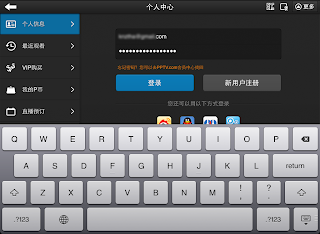
  ၃) iDevice တြင္ "PPTV" App ကို ဖြင့္ၿပီး SignIn ဝင္ပါ။ 


  ၄) ထို႔ေနာက္ App ကို ပိတ္လိုက္ပါ။ (Multitesk ထဲမွာပါ ဝင္ပိတ္ပါ) 

  ၅) Download ေပးထားေသာ "PPTV(VIP)@moethagyar.info.rar" ကို ျဖည္ပါ။ 
     Folder ထဲတြင္ ("PPTV.dylib" ႏွင့္ "PPTV.plist") file ႏွစ္ခုကို ေတြ႕ရပါမည္။ 

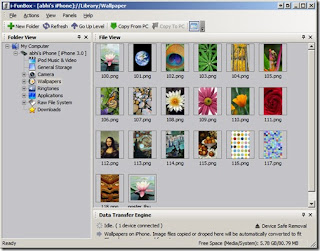
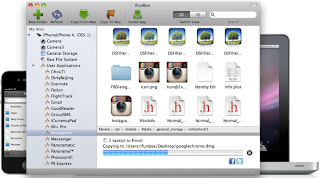
  ၆) iFile, iFunBox, iTools တစ္ခုခုကို အသံုးျပဳ၍ 
     "library/MobileSubstrate/DynamicLIbraries" လမ္းေၾကာင္းထဲသို႔ Copy/Paste ႏွင့္ ထည့္ပါ။ 
      
  • iFile View 


  • iFunBox View 


  ၇) Device ကို Reboot လုပ္ပါ။ 

PPTV App ကိုဖြင့္ၿပီး SingIn ဝင္လိုက္တာႏွင့္ မိမိ၏ account တြင္ VIP အျဖစ္ ေဖာ္ျပေနပါလိမ့္မည္။ 


အခုဆိုရင္ VIP video မ်ားကို အတားအဆီးမရွိ ၾကည့္႐ႈႏိုင္သြားပါၿပီ... 


PPTV ကို WiFi အသံုးျပဳ၍ အျခားမည္သည့္ Device မွ ၾကားရန္ခံမလိုပဲ Smart TV ေပၚသို႔လည္း တိုက္႐ိုက္ ထုတ္ယူ ၾကည့္႐ႈႏိုင္ပါသည္။ 


အားလံုးပဲ အဆင္ေျပၾကလိမ့္မယ္လို႔ ေမွ်ာ္လင့္ပါတယ္.. 


Credit to : ****** 


အခမဲ့ဆိုတဲ့ အရာတိုင္းမွာ ခန္ ့မွန္းလို ့ မရႏိုင္တဲ့ တန္ဖိုးတစ္ခုေတာ့ အၿမဲရွိေနပါတယ္.... 

ဤေဆာင္းပါးေလးကေန သင့္အတြက္ တစ္ခုခု ရလိုက္တယ္ဆိုရင္ ေအာက္မွာ "Like & Share" လုပ္ႏိုင္ပါတယ္ 

မိုးသိၾကား ဘေလာ့ခ္အား ဆက္လက္ရွင္သန္ရန္ အားေပးလိုသူမ်ား Side bar တြင္ "Donate" လုပ္ျခင္းျဖင့္ ကူညီႏိုင္ပါသည္... 


မိုးသိၾကား

Friday, 22 February 2013

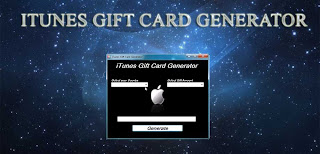
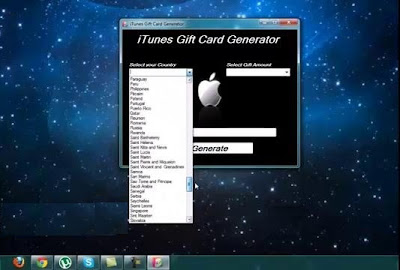
iTune Gift Card Generator 2013 ( Not Available In Myanmar :P )

Unknown | 22.2.13 | Best Blogger Tips


iTune Gift Card Generator 2013 ေလးတင္ေပးလိုက္ပါတယ္...ေဒၚလာေရြး..ႏိုင္ငံေရြးၿပီး  ေပၚလာတဲ့

Website ထဲက Survey ေရြးၿပီး.. တန္ဖိုးရွိေသာ Code မ်ားကိုအျမန္ဆံုး ရယူလိုက္ၾကပါ... မွတ္ခ်က္.. ျမန္မာ

ႏိုင္ငံမွာေတာ့ ဒီ Software က သံုးစားမရပါ.. :P


Want
more music, movies, books and TV shows in iTunes but too cheap to buy
them all? Don’t want to take a risk pirating them? We share your pain.
This is why we decided to release iTunes Code Generator that is 100%
working and functional, as of November 2012. All of our users who have
used the program has reported tremendous success with it, redeeming
hundreds and thousands of dollars worth iTunes codes, enabling them to
purchase a ton of stuffs in iTunes.


If
you have been looking for a working iTunes Code Generator, your search
is over. Download our latest version of free iTunes Code Generator and
start using them to generate free iTunes codes that you can redeem right
away. It wouldn’t be any easier to use and it’s bullet-proof way to
create iTunes codes without having to pay a penny.


Free
iTunes Code Generator is basically a free standalone program you can
download directly off our website. You can use the program to generate
free iTunes codes that can be redeemed in your iTunes account. What this
means is, you no longer have to spend real money to load your account
to purchase anything in iTunes!


We
have used free iTunes Codes Generator successfully for the past few
months, purchasing a ton of music, movies and tv shows ourselves and
haven’t had any problem. Just to play on the safe side, don’t go nuts
and redeem thousands of dollars worth of iTunes codes in one day! Start
off by redeeming a $10 or $25 iTunes code first to see if it works –
which it should – and regularly load up your account in healthy
intervals.


iTunes Gift Card Generator is 100% safe to use as long as you are sensible with it.


iTunes
codes that were created using our iTunes Gift Card Code Generator are
exactly the same thing as the ones you could get from scratching off the
iTunes Gift Card or Gift Certificates. Based on proprietary algorithm,
the program will generate the codes exactly the way Apple would do so.


You
can purchase anything you want, as long as it’s within iTunes Store to
purchase. Music, movies, and TV shows are what most of our users end up
buying using the iTunes codes. You can also purchase any apps for your
iPhone, iPod and iPad, as well as any in-app purchases.


Wednesday, 31 October 2012

Apple Device အသံုးျပဳသူမ်ားအတြက္ iTune နဲ႕အဆင္ေျပေစမယ့္ iFunbox ပါ

Unknown | 31.10.12 | Best Blogger Tips

Apple Device အသံုးျပဳေနတဲ့ သူေတြ သီခ်င္းေတြ ပံုေတြထည့္သြင္းတဲ့အခါ iTune
နဲ႔ အဆင္မေျပ ျဖစ္ၾကတာမ်ားပါတယ္။ အထဲမွာ ရိွတဲ့ Data ေတြဟာ မိမိ
ကြန္ပ်ဴတာနဲ႔ သြင္းထားတာ မဟုတ္တဲ့ အခါမွာ ျဖစ္ၾကတာမ်ားပါတယ္။ အဲဒီလို
ျပႆနာေတြမရိွေအာင္ iFunbox နဲ႔အသံုးျပဳႏိုင္ပါတယ္။ အသံုးျပဳရတာ လြယ္ပါတယ္။
ဒါေပမယ့္ မိမိကြန္ပ်ဴတာမွာကေတာ့ iTune တင္ထား ရပါမယ္။ ၿပီးရင္ iFunbox
ကိုဖြင့္ၿပီး အလြယ္တကူ Copy, Paste ျပဳလုပ္ၿပီးအသံုးျပဳႏိုင္ပါတယ္။


Download ===> Mediafire4Shared

(4shared Account မရွိသူမ်ားအတြက္ Username: mailserver.npt@gmail.com Passwords: 12213456 - passwords ခ်ိန္းမသြားၾကပါရန္ ေမတၱာရပ္ခံအပ္ပါတယ္ခင္ဗ်ာ)