Showing posts with label YouTube. Show all posts

Tuesday, 11 February 2014

YouTube က HD Movies ေတြကို ေဒါင္းဖို႔ Youtube HD Downloader

Unknown | 11.2.14 | | Best Blogger Tips


 ကြန္ျပဴတာမွာ IDM ကိုေတာ့ အမ်ားဆံုးအသံုးျပဳ႕ၾကပါတယ္။ျမန္လည္းျမန္တယ္ေလ။

ဒီေကာင္ေလးကေတာ့ IDM နဲ႔ အဆင္မေျပတဲ့ အခါ မ်ဳိး IDM မရွိတဲ့ အခါမ်ဳိးေတြမွာ 

အသံုးျပဳ႕လို႔ရပါတယ္။

Movies အေကာင္းစား HD ေတြ ကိုေဒါင္းဖို႔ အတြက္ အသင့္ေတာ္ဆံုးပါပဲ

အသံုးျပဳ႕မယ္ဆိုေအာက္မွာယူသြားလိုက္ပါ ခင္ဗ်ာ

DOWNLOAD

MILOSHARE | TUSFILES | DEV-HOST

ကိုလတ္(ကြ်ဲဆင္း)

Wednesday, 1 January 2014

YouTube Video ေတြ အျမန္ဆံုးနည္းနဲ႔ ၾကည့္ၾကမယ္

Unknown | 1.1.14 | Best Blogger Tips

YouTube က Video ေတြၾကည့္ၾကတဲ႔အခါ လိုင္း ဘယ္ေလာက္ ေကာင္းေကာင္း Loading လုပ္ေနတာ အရမ္းၾကာတာမ်ိဳးေတြ အားလံုး ၾကံဳဖူးၾကမယ္ထင္ပါတယ္... ေၾကာ္ျငာေတြ , YouTube Page ထဲမွာ ရွိသမွ် Video ေတြကို Loading လုပ္ေနရတာေၾကာင့္ပါ... ျပီးေတာ့ အညံ့ဆံုး Lower Quality ျဖစ္တဲ႔ 144p ရုပ္ထြက္နဲ႔ Default ထားထားပါေသးတယ္ ဘယ္လိုမွ ၾကည့္ရတာ အဆင္မေျပပါဘူး..။ 
အဲ့ဒီျပႆနာေတြကို Command Prompt (CMD) ကဆင့္ Hack ျပီး ေျဖရွင္းႏိုင္တယ္။
Hack ဆိုတာနဲ႔ အရမ္းအခတ္ခဲၾကီး မဟုတ္ပါဘူး ေအာက္က Command ေလးေတြကို Copy & Paste လုပ္ျပီး Enter ေခါက္ေပးရံုပါပဲ... OK ေလးေပၚလာတာနဲ႔ Command Box ကိုပိတ္ျပီး YouTube ကို သြားၾကည့္လိုက္ပါ... အရင္ကထက္  ၃ ဆေလာက္ ျမန္ဆန္လာတာကို လက္ေတြ႕ ေတြ႕ျမင္ၾကရမွာ..  Windows (XP, 7, 8, Vista) ေတြ အားလံုးမွာ အလုပ္လုပ္ပါတယ္..။

Hack နည္းကေတာ့...
Start က Search Box မွာ CMD ေရးထည့္ပါ CMD > Right-Click > ‘Run as Administrator’    နဲ႔ Run ျပီး Command Prompt ထဲမွာ ဒီေအာက္က  အနီ ေရာင္နဲ႔ ျပထားတဲ႔ Command ကုဒ္ ေတြကို Copy ကူး Right-Click နဲ႔ Paste ခ်ျပီး Enter ေခါက္လိုက္ပါ..။

netsh advfirewall firewall add rule name=”YouTubeTweak” dir=in action=block remoteip=173.194.55.0/24,206.111.0.0/16 enable=yes
Command-prompt

2013-04-05_044008

ျပီးသြားရင္ Command Prompt ကိုပိတ္လိုက္ပါ..။ YouTube က Video တစ္ခုခုကိုသြားၾကည့္လိုက္ပါ.. ျမန္ျမန္ ဆန္ဆန္ နဲ႔ Video အရည္အေသြးကိုလည္း အနည္းဆံုး 480p နဲ႔ ၾကည္ၾကည္လင္လင္ၾကည့္ရွဳ႕ရမွာျဖစ္လုိ႔ သင္ေပ်ာ္ရႊင္ေနမယ္ဆိုတာ က်ေနာ္ယံုၾကည္ပါတယ္..။
အရင္ ပံုမွန္အတိုင္း ျပန္ထားခ်င္တယ္ဆိုရင္ေတာ့ ေအာက္က အနီ ေရာင္နဲ႔  Command ကုဒ္ ေတြကို Copy ကူးျပီး ေစာေစာကအတိုင္း Paste ခ်ျပီး Enter ေခါက္ေပးလိုက္ပါ..။
 netsh advfirewall firewall delete rule name=”YouTubeTweak”.
ႏွစ္သစ္မွာ ေပ်ာ္ရႊင္ၾကပါေစ
ဝင္းကမာၻေက်ာ္
www.winkabarkyaw.net


Thursday, 24 October 2013

YOUTUBE DOWNLOADER ကိုအသံုးျပဳခ်င္သူမ်ားအတြက္

စိုင္းသူနည္းပညာ ျပန္လည္မွ်ေဝျခင္း | 24.10.13 | Best Blogger Tips


YouTube Downloader Pro YTD 4.6 Full Version + Crack

YOUTUBE DOWNLOADER ကိုလိုခ်င္ၾကတဲ ့မိတ္ေဆြေတြအတြက္ပါ။ ထြက္တာေတာ ့နွစ္ရက္ေလာက္ရိွပါျပီ။မအားလို ့မတင္ေပးနိုင္ေသးတာပါ။သူကို ့ဘယ္လိုသံုးရတယ္ဆိုတာ
ေတာ ့လူတိုင္းသိျပီးသားပါ။အေရးၾကံဳ၇င္ထုတ္သံုးလိုက္လို ့ရေအာင္ျပန္လည္မ်ွေဝေပးလိုက္ပါတယ္။
ဖိုင္ဆိုဒ္ ကေတာ ့ ( 13 mb ) ပါ ခင္ဗ်ာ။အသံုးလုိသူမ်ားေအာက္မွာေဒါင္းလုပ္ဆြဲနိုင္ပါျပီခင္ဗ်ာ  ။ FULL VERSION ရေအာင္PATCH FILE ေလးကိုခ်ိဳးေပးဖို ့မေမ ့နဲ ့ေနာ္။


DOWNLOAD    -  ZIPPYSHARE   ,  TUSFILES  ,  SHAREBEAST


အသစ္တင္တိုင္း FACEBOOK ကေနဖတ္မယ္ဆိုရင္
ဒီမွာ LIKE လုပ္ေပးထားပါ။


ေဒါင္းနည္းမသိခဲ့ပါက { ဒီမွာ } သြားလိုက္ပါ

Sunday, 22 September 2013

YouTube က Video ေတြ ေဒါင္းယူျပီး ဖြင့္မရ ၾကည့္မရျဖစ္ေနရင္ & Software မသံုးပဲ ေဒါင္းယူနည္း

Unknown | 22.9.13 | | | Best Blogger Tips


Aung Kyaw:


YouTube မွာတင္တဲ့ သီခ်င္း MTV ေတြကို IDM နဲ႔ အရင္ကလိုေဒါင္းလို႔မရေတာ့ဘူးျဖစ္ေနတယ္
ဘယ္လိုျဖစ္သြားတာလဲဟင္
YTD နဲ႔ ဆြဲလည္း မရဘူးခင္ဗ်။


ျပီးေတာ့..


YouTube က Video ေတြဆြဲလိုက္တယ္ဗ်ာ
ေဒါင္းယူလို႔ရတယ္
ဒါေပမဲ့ဖြင့္ၾကည့္ရင္ ၾကည့္မရဘူး။.
ဘာ Player နဲ႔ပဲဖြင့္ဖြင့္ ၾကည့္လို႔မရဘူးျဖစ္ေနတယ္။
ဘယ္လိုျဖစ္တာလဲခင္ဗ်ာ။
ကူညီပါဦးေနာ္။


Facebook ကေန သူငယ္ခ်င္းတစ္ေယာက္ ေမးလာလို႔ မသိေသးတဲ႔ သူငယ္ခ်င္းေတြတြက္ ျပန္လည္မွ်ေဝေပးလိုက္ပါတယ္... သူေျပာသလိုပဲ ကိုယ္တိုင္ ၾကံဳေတာ့မွပဲ သိေတာ့တယ္...။


OK.... ပထမဆံုး....


စက္ထဲမွာ Internet Download Manager (IDM) ရွိေနရက္နဲ႔ YouTube Video ရဲ႕အေပၚ ညာဘက္ေထာင့္နားက Download this video ဆိုတဲ႔ Button ေလး မေပၚပဲ ေဒါင္းမရ ျဖစ္ေနရင္ေတာ့  IDM ကို Update လုပ္ေပးပါ. .. IDM ကို Update လုပ္ေပးအျပီး Serial Key ေတာင္းေနရင္ Full Version ျဖစ္ဖို႔အတြက္ ဒီပို႔စ္ထဲ ကအတိုင္း လုပ္ေပးလိုက္ပါ....။


 (IDM မရွိေသးတဲ႔ သူငယ္ခ်င္းမ်ားလည္း အဲ့ဒီပို႔စ္ ထဲကအတိုင္း မိမိတို႔ စက္မွာ ေဒါင္းယူ Install ႏိုင္ပါတယ္ အင္တာနက္ထဲက Software ,Video,Music ေတြနဲ႔ အျခား မိမိ လိုခ်င္တာေတြ ေဒါင္းယူတဲ႔ေနရာမွာ အဆင္ေျပဆံုး Downloader ေလးပါ စက္တိုင္းထည့္ထားရွိသင့္ပါတယ္။ ေဒါင္းမရဘူး မေဒါင္းတတ္ေသးဘူးဆိုရင္ေတာ့ ဒီပို႔စ္ကို ဖတ္ေပးပါ)


IDM ကို Update လုပ္ျပီးေတာ့လည္း Download this video ဆိုတဲ႔ Button ေလး မေပၚေသးဘူးဆိုရင္ေတာ့ ဒီပို႔စ္ထဲ ကအတိုင္း လုပ္ေပးႏိုင္ပါတယ္...။


 ေနာက္တစ္ခုက YouTube Video ေတြ ေဒါင္းယူျပီး ဖြင့္မရ  ၾကည့္မရ ျဖစ္ေနရင္ေတာ့... ဒီနည္းေလးေတြနဲ႔ ျပန္ေဒါင္းယူပါ...


 ပထမဆံုး IDM ထည့္ထားတယ္ဆိုရင္ Download this video ဆိုတဲ႔ Button ေလးကို ႏွိပ္ပါ... ေရြးစရာ Format ေတြထဲက MP4 Format ကို ေရြးျပီးေဒါင္းယူပါ... (တခ်ိဳ႕ Video ေတြမွာ အဲ့ဒီလို ေရြးစရာေတြ မေပၚတတ္ပါဘူး)
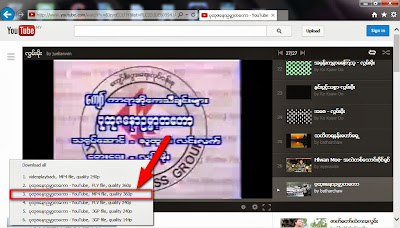


အဲ့ဒီလို ေရြးစရာ Format ေတြမေပၚခဲ့ရင္ တျခား Browser(IE,Firefox,Chrome) ေတြကတဆင့္ ေျပာင္းျပီး ေဒါင္းၾကည့္ပါ .. ။


Software မသံုးပဲ ေဒါင္းယူနည္း


ေနာက္ဆံုး အဆင္မေျပဘူးဆိုရင္ေတာ့ ( ေရြးစရာ Format ေတြမေပၚခဲ့ရင္) ဒီနည္းအတိုင္း ေဒါင္းယူႏိုင္ပါတယ္...
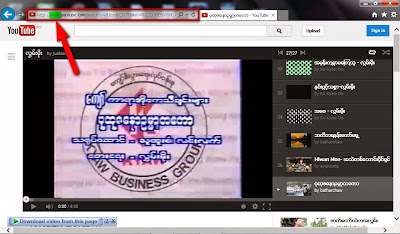


ေဒါင္းယူျပီး ၾကည့္မရ ဖြင့္မရတဲ႔ Video ေနရာကို ျပန္သြားပါ... အေပၚက ပံုအတိုင္း မွ်ားျပထားတဲ႔ ေနရာက (Link) မွာ အစိမ္းေရာင္ေလးနဲ႔ ျပထားတဲ့ေနရာက www.  ကို ဖ်က္ျပီး ss (s ႏွစ္လံုး) နဲ႔ အစားထိုးေရးျပီး Enter ေခါက္ပါ...


(ဥပမာ ။ ။ http://[www.]youtube.com/watch?v=8JzyoECt7JY&list=PLC2D3DE605941A73E


အဲ့ဒီ Link က အနီေရာင္နဲ႔ ျပထားတဲ႔ www. ကို ဖ်က္ျပီး ss ကို အစားထိုးေရးေပးရမွာပါ)


ဒီပုံေလးအတိုင္းပါ..(ပံုေတြကို အၾကီးခ်ဲ႕ခ်င္ရင္ပံုကို ႏွိပ္လိုက္ပါ)
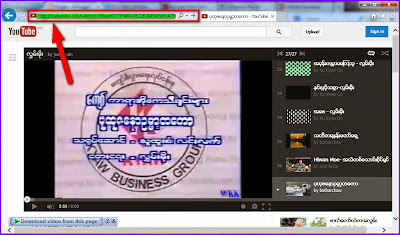


ေနာက္စာမ်က္ႏွာတစ္ခု ပြင့္လာမွာပါ ...
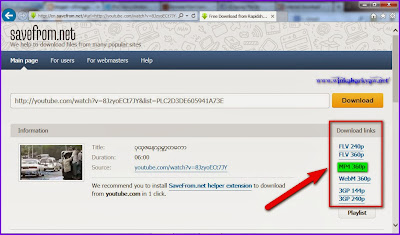


မွ်ားျပထားတဲ႔ေနရာကအတိုင္း ေဒါင္းယူႏိုင္မဲ့ Format ေတြ က်လာပါလိမ့္မယ္ .. MP4 ကိုသာ ေရြးျပီး ေဒါင္းယူလိုက္ပါ.. ေစာေစာက ၾကည့္မရတဲ႔ Video ဟာ ခု ၾကည့္လို႔ရသြားပါျပီ...။ အဲ့ဒါကေတာ့ ဘာ Software မွ မသံုးပဲ ေဒါင္းယူတဲ႔ နည္းပါပဲ...။


 အဆင္မေျပေသးရင္ေတာ့ ဒီ Video ေလးကိုၾကည့္ႏိုင္ပါတယ္ စကားေျပာအသံေလးပါထည့္ထားျပီး အေတြ႕အၾကံဳေလးကို ရွင္းျပထားတာပါ.. ေက်းဇူးတင္ပါတယ္..:)


အားလံုး အဆင္ေျပၾကပါေစ..


ခင္မင္လွ်က္


ဝင္းကမာၻေက်ာ္


www.winkabarkyaw.net


Tuesday, 27 August 2013

YouTubeကို မထစ္ဘဲ ၾကည့္မယ္

Unknown | 27.8.13 | | Best Blogger Tips


YouTubeကို မထစ္ဘဲ ၾကည့္မယ္

ကြန္နက္ရွင္ မေကာင္းတဲ့သူေတြအတြက္ YouTubeကို ၾကည့္ရင္ Pause လုပ္ထားၿပီး Video တစ္ခုလံုးကို Preloadလုပ္ၿပီးေတာ့မွ ၾကည့္ရင္ မထစ္ဘဲ ၾကည့္ႏိုင္ပါတယ္။ ဒါကအရင္တုန္းက သံုးလ႔ို ရတဲ့နည္းပါ။ 

အဲဒီနည္းကို အခုအသံုးျပဳလို ့မရေတာ့ပါဘူး။ ဘာလို႔လဲဆိုရင္ YouTubeက အတိုေကာက္အားျဖင့္ DASHလုိ႔ေခၚတဲ့ Dynamic Adaptive Streaming over HTTPကို ေျပာင္းလဲ အသံုးျပဳလိုက္တဲ့ အတြက္ေၾကာင့္ ျဖစ္ပါတယ္။ DASHကို Disableလုပ္လို ့ ရတဲ့နည္းကေတာ့ YouTube Centerဆိုတဲ့ Browser Extensionကို အသံုးျပဳရမွာပါ။ YouTube Centerကို Firefox, Chrome, Opera, Safari, Maxthonစတဲ့ Browserေတြမွာ သံုးႏိုင္ပါတယ္။
YouTube Centerကို သက္ဆိုင္ရာ Browserမွာ အင္စေတာလုပ္ၿပီးရင္ YouTubeကို Login ၀င္ပါ။ သင့္အေကာင့္ပံုေဘးမွာ Gear Iconကို ေတြ ့ျမင္ႏုိင္ၿပီး Gear Iconကိုႏွိပ္ပါ။ YouTube Center Settings ေပၚလာရင္ Player ေအာက္က Dash Playbackကို Uncheck လုပ္ပါ။ ဒါဆိုရင္ အရင္နည္းအတိုင္း YouTubeကို မထစ္ဘဲ ၾကည့္ႏိုင္ပါၿပီ။


YouTube Centerကို Official Websiteကေနတစ္ဆင့္ သက္ဆိုင္ရာ Browserေတြမွာ အင္စေတာ လုပ္ႏိုင္ပါတယ္။ Chrome Web Storeမွာ YouTube Center မရွိတဲ့အတြက္ Chrome User ေတြအတြက္ေတာ့ YouTube Centerရဲ ့ Extensionဖိုင္ကို ေဒါင္းလုပ္လုပ္ၿပီး Extension Page ထဲကို Drag and Drop လုပ္ၿပီး Manual Install လုပ္ရမွာပါ။ Extension Pageမွာ Developer Modeကို Onထားရပါမယ္။
Download YouTube Center


utm_campaign=socialflow_lifehacker_facebook&utm_source=lifehacker_facebook&utm_medium=socialflow


အိုင္တီေခတ္


Monday, 26 August 2013

Youtube Downloader Pro YTD 4.5.2 Fullversion

Unknown | 26.8.13 | | Best Blogger Tips


ဒါေလးကေတာ့ Youtube ကေန HD Movies ေတြကိုေဒါင္းဖို႔


Pro ဗားရွင္းေလးပါ ဒီထဲမွာ မိမိႀကိဳက္ရာ မိမိ အသံုးတဲ့ ႏိူင္တဲ့ Format ကို


တခါတည္း convert လုပ္ေပးႏူိင္ပါတယ္ သံုးမယ္ဆိုေအာက္မွာ ေဒါင္းသြားလိုက္ပါ ခင္ဗ်ာ


ဒါေလးက set up file ေလးပါေအာက္မွာေဒါင္းပါ


PATCH ဖိုင္ေလး ကိုေအာက္မွာေဒါင္းလိုက္ပါ


အိုင္တီေခတ္


Thursday, 22 August 2013

YOUTUBE DOWNLOADER FULL VERSION

Unknown | 22.8.13 | | | | | Best Blogger Tips


YOUTUBE
DOWNLOADER ေလးကိုေနာက္ဆံုးထြက္ UPDATE ေလးေတြ ့လို
့တင္ေပးလိုက္ပါတယ္ခင္ဗ်ာ။ဒီေကာင္ေလးက YouTube, FaceBook, Google Video,
MySpaceTV
အျပင္ေတာ္ေတာ္မ်ားမ်ားမွဖိုင္ေတြကိုေဒါင္းလုပ္ယူနိုင္ပါတယ္ခင္ဗ်ာ။သူ
့ကိုအသံုးျပဳမယ္ဆိုရင္ မိမိကူးယူလိုတဲ ့ ဗြီဒီယိုဖိုင္ တစ္ခုခုကို RIGHT
CLICK ေထာက္ျပီး COPY URL ယူျပီး ဒီေကာင္ေလးထဲမွာPASTE လုပ္ေပးတာနဲ ့
အဆင္ေျပပါျပီ။


ဒါကနည္းနည္းေလ ့လာဖို ့ဖတ္ထားေပးပါခင္ဗ်ာ။


General Points:

• Download videos from YouTube, FaceBook, Google Video, MySpaceTV and many others

• Allows you to access YouTube videos for which you need to be 18+ years of age

• Converts video for Ipod, Iphone, PSP, Cell Phone, Windows Media, XVid and MP3

• Provides the ability to cut and select the output quality of converted videos

• Uses the FFmpeg engine to convert the videos

• Plays videos downloaded in Flash

• Extremely easy to use Incl Crack [TorDigger]


Installation Instructions:


  • Install Program.Don't Run application.

  • Copy content from crack folder and paste into default installation directory.

  • Done, Enjoy.


ေအာက္မွာေဒါင္းလုပ္ယူေပးပါခင္ဗ်ာ။


CREDIT TO -THE WORLD OF CRACKS


ဒါကေတာ ့ PASSWORD ပါ ခင္ဗ်ာ


(YTD) v4.5.0.2 Full Setup : Link1 - Link2


(YTD) v4.5.0.2 Full Crack : Link1 - Link


Tuesday, 23 July 2013

YouTube ကို Dance အက, က,ခိုင္းမယ္ (အပ်င္းေျပေစဖို႔ပါ)

Unknown | 23.7.13 | | | Best Blogger Tips


 ဒါေလးကေတာ့ အပ်င္းေစဖို႔နဲ႔ ဗဟုသုတရေစဖို႔ အတြက္ ရည္ရြယ္ပါတယ္ခင္မ်ာ... အားလံုးသိၾကတဲ႔ YouTube မွာ Dance က,ခိုင္းၾကည့္တာပါ.... စမ္းၾကည့္လိုက္ပါ တကယ္ အပ်င္းေျပေစမွာပါ....


ဒီေနရာက ေန YouTube ကိုဝင္ပါ...


ျပီးရင္ ဒီေအာက္က အနီေရာင္နဲ႔ စာလံုးေတြကို Copy ကူးျပီး YouTube ရဲ႕ Search Box ထဲမွာ Paste လုပ္ျပီး Enter ေခါက္ၾကည့္လိုက္ပါ... ျမဴးၾကြတဲ႔ သံစဥ္နဲ႔အတူ YouTube မ်က္ႏွာျပင္ေပၚမွာရွိတဲ႔ ပံုေတြ , စာလံုးေတြအားလံုး က,ခုန္ေနၾကတာျမင္ေတြ႕ရပါလိမ့္မယ္...


Do The Harlem Shake


How To make Youtube Dance


အားလံုးေပ်ာ္ရႊင္ၾကပါေစ...

ခင္မင္လွ်က္


ဝင္းကမာၻေက်ာ္


www.winkabarkyaw.net


Monday, 18 February 2013

Apowersoft YouTube Downloader Suite 3.2.3 Full Version ( 23 MB )

Unknown | 18.2.13 | Best Blogger Tips


Youtube က Video ေတြကို Format အမ်ိဳးမ်ိဳးနဲ႕ Download ရယူေပးမယ့္ YouTube
Downloader ေလးျဖစ္ပါတယ္.လိုအပ္သူမ်ား Download ရယူႏိုင္ပါၿပီခင္မ်ာ..


DownloadKeygen=>Solidfiles / Tusfiles 


Release Information


The Apowersoft YouTube Downloader Suite is the best YouTube downloader
software. It not only helps you download videos from YouTube, but also
converts YouTube videos to all video and audio formats you need to watch
and listen on your iPod, iPhone, mp3 or mp4 players, etc. You can
download and convert YouTube videos to AVI, MP4, WMV, WMA, etc. and
make audio files in formats such as MP3, AAC, etc


  • Download video from YouTube automatically

  • Convert YouTube videos to any formats

  • Easily search for videos by inputting keywords

  • Preview your downloaded videos

  • Play videos with a nice built-in video player


Released on 02/14/13 for exclusive usage by members of the release
scene. This isnt something to share with your school mates and not for
sale Go and buy this app if you like it!


In addition, the tool supports editing videos, so you can trim, crop, adjust effects, etc


Tuesday, 13 November 2012

YouTube Downloader Pro 3.9.5 Full Version

Unknown | 13.11.12 | | Best Blogger Tips


 YouTube Downloader Pro ေလးကိုေတာင္းထားလို႔ ေနာက္ဆံုး Version ကို အားလံုးအတြက္တင္ေပးလိုက္ပါတယ္....။


What is YouTube Downloader?


YouTube Downloader is software that allows you to download videos from YouTube, Facebook, Google Video, Yahoo Video, and many others and convert them to other video formats.


The program is easy to use, just specify the URL for the video you want to download and click the Ok button!It also allows you to convert downloaded videos for Ipod, Iphone, PSP, Cell Phone, Windows Media, XVid and MP3.You can use YouTube Downloader to download the videos of your choice from home, at the office or in school.


Download YouTube Downloader now and get started downloading your favorite videos from YouTube and many other sites.


General Points:


  • Download videos from YouTube, FaceBook, Google Video, MySpaceTV and many others

  • Allows you to download YouTube videos for which you need to be 18+ years of age

  • Converts video for Ipod, Iphone, Ipad, PSP, Cell Phone, Windows Media, XVid and MP3

  • Provides the ability to cut and select the output quality of converted videos

  • Plays videos downloaded in Flash

  • Extremely easy to use


Tuesday, 23 October 2012

YouTube ကသီခ်င္းေတြကို MP3 Format ႏွင့္ ေဒါင္းယူနည္း

Unknown | 23.10.12 | | | Best Blogger Tips


YouTube MP3 Convert


 သူငယ္ခ်င္းတစ္ေယာက္ ေမးထားတာေလးပါ YouTube ကေန MP3 အျဖစ္ ဘယ္လို Convent လုပ္ယူရမလဲ ဘယ္လို ေဒါင္းယူရမလဲ ဆိုျပီးေမးေနတာပါ....


 YouTube က သီခ်င္းေတြကို ဘာ Software မွမသံုးပဲ  MP3 Format နဲ႔ တိုက္ရိုက္ ေဒါင္းယူႏိုင္ေအာင္ ဖန္တီးေပးထားတာပါ...


သူကေတာ့ YouTube Mp3 Pro ဆိုတဲ႔  Browser Add On ေလးတစ္ခုပါ

Firefox,Chrome,Opera စ,တဲ႔ Browser ေတြမွာဒီ Add on ေလးကို ထည့္ေပးလိုက္ရံုပါပဲ... MP3 အရည္အေသြးကိုလည္း ေရြးျပီး ေဒါင္းယူႏိုင္ပါေသးတယ္...


အဆင္ေျပၾကပါေစ...


Thursday, 16 August 2012

Adobe Flash Player 11.3.300.271 (အင္တာနက္ေပၚက Video ေတြ ၾကည့္မရျဖစ္ေနရင္)

Unknown | 16.8.12 | | | Best Blogger Tips


Adobe Flash Player ကိုေတာ့ အားလံုးသိၾကမွာပါ...YouTube က Video ေတြ Facebook က Video ေတြ ၾကည့္မရျဖစ္ေနရင္ ေဒါင္းယူ Run ေပးႏိုင္ပါတယ္...။


Adobe Flash Player - is a plugin for web browsers are required to run applications created by using Flash. Adobe Flash Player is used for playing audio and video materials, a variety of interactive web applications, games, and similar media content centered on the work in the browser. This technology is used everywhere and is required on every computer.


Flash Player 11.3 Features:

* Full screen keyboard input – This feature enables support for all keyboard keys available to an embedded SWF running inside of a page without full screen mode (except for ‘Esc’). It allows developers to determine if the app is in full screen, whether full keyboard input is allowed, and whether the app is able to request full screen (determined by the embed tag parameter).

* Low latency audio support for streaming audio through NetStream – This feature aims to reduce latency for high quality streaming audio playback. It addresses a very special use case of cloud gaming, where the game is rendered at a server and audio and video are streamed to the client.


* Protected Mode for Firefox – Flash Player Protected Mode is a new security enhancement designed to limit the impact of attacks launched from malicious SWF files against Adobe Flash Player when running in Firefox 4.0 + on Windows Vista and higher. This feature is comparable to the Flash Player Protected Mode in Google Chrome browser, Protected Mode in Adobe Reader, and Office 2010 Protected View.

* Flash Player background updates (Mac) – New versions of the runtimes can now be delivered more effectively to the end user with this enhanced updating mechanism (Background update is only available in the release versions of Flash Player).

* Low latency audio support (Sound API) – This enhancement reduces the latency for Sound.play method and changes to volume and pan on SoundTransform. The latency of SAMPLE_DATA event should also be reduced considerably.

* Texture Streaming for Stage3D – Provides an ability to upload coarser, lower quality textures on the GPU first and then progressively improve them as more data becomes available


Click Here to Download


Saturday, 11 August 2012

YouTube Downloader Pro 3.9.0 Full Version

Unknown | 11.8.12 | | Best Blogger Tips


YouTube က Video , Music ေတြကို ၾကိဳက္ႏွစ္သက္ရာ Format မ်ားနဲ႔ အလြယ္တကူ ေဒါင္းယူ Convent လုပ္ေပးႏိုင္တဲ႔ Software  ေလးပါ....:)
General Points :
Download videos from YouTube, Google Video, MySpaceTV and many others

Allows you to access YouTube videos for which you need to be 18+ years of age

Converts video for Ipod, Iphone, PSP, Cell Phone, Windows Media, XVid and MP3

Provides the ability to cut and select the output quality of converted videos

Uses the FFmpeg engine to convert the videos

Plays videos downloaded in Flash

Extremely easy to use


System Requirement :
Intel Pentium 233 Mhz (or equivalent processor, such as AMD) or better

Windows 2000/XP/Vista/7

Explorer 5.0 or higher

64 MB of RAM

Adobe Flash Player

Visual Basic 6.0 Run-Time Files
