Thursday, 30 May 2013

Google Play Store app with version 4.1.10

Unknown | 30.5.13 | Best Blogger Tips


Android ဖုန္းေတြအတြက္ Google play ေနာက္ဆံုးထြက္ update


ေလးပါ အျခားေနရာမွာေဒါင္းရတာ အခက္အခဲရွိတယ္ ဆိုရင္ 


ေအာက္မွာေဒါင္းၿပီး အသံုးျပဳ႕လို႔ရပါတယ္ ခင္ဗ်ာ


A new update to the Google Play Store app with version 4.1.10 is rolling out following the big 4.1.6 refresh


 from two weeks ago, just before I/O. 


As far as I can tell from a quick teardown and playing around, this is a minor update. 


All the important changes happened in the previous release, so 4.1.10 is likely a bug fixer. 


That said, if you see something I missed, please drop a line in the comments.


 ကိုလတ္(ကြ်ဲဆင္း)


Uniblue SpeedUp My PC 2013 v5.3.8.0 Multilingual + Serial Key

Unknown | 30.5.13 | Best Blogger Tips


https://blogger.googleusercontent.com/img/b/R29vZ2xl/AVvXsEhiS3hGfXUlwjkZ59W58axQ75r11T7V41IIC6ljTOcJTKGkaFCJjLwTborn_8UHE9Nua1ES0XcO_qWKJQCib4GLZGYuZA1FWz1dlIUTYJPPblNb6JS_4ecXWLMXG-jV7qz3yEf_rAAEClE/s1600/Uniblue_SpeedUpMyPC_2013_5.3.1.2_Full_Version.png


မိမိရဲ႕ ကြန္ျပဴတာ Model နိမ့္လို႕ ေႏွးေကြးေလးလံေနသူမ်ားအတြက္ ကြန္ျပဴတာရဲ႕ Speed ကိုအေကာင္း

ဆံုးျမွင့္တင္ေပးႏိုင္တဲ႕ Uniblue SpeedUp My PC 2013 v5.3.8.0 ေနာက္ဆံုးထြက္ Version ကိုမွ်ေ၀ေပး

လိုက္ပါတယ္ဗ်ာ။ Model နိမ့္တဲ့ စက္ေတြကိုေတာင္ျမွင့္တင္ေပးႏိုင္တယ္ဆိုရင္ အျမင့္ေတြကိုသာထပ္ျပီး

ျမွင့္လိုက္မယ္ဆိုရင္ေတာ့ ရွယ္ဘဲေပါ့ေနာ္။ Speed Up Software ေတြကို ခဏခဏတင္ေပးေနၾကျဖစ္ေန

ေတာ့ အသံုးျပဳနည္းကို ရွင္းျပေပးေနစရာမလိုေတာ့ပါဘူးေနာ္။
အျမဲတမ္းသံုးႏိုင္ေအာင္လို႕ Serial Key ကိုမွ်ေ၀ေပးလိုက္ပါတယ္ဗ်ာ။
အေသးစိတ္ေလ့လာခ်င္ရင္ေတာ့ေအာက္မွာေဖာ္ျပေပးထားပါတယ္ဗ်ာ။


SpeedUpMyPC - the award winning utility software that ensures your PC is automatically optimized for maximum performance in just a few easy clicks.
SpeedUpMyPC is a system utility that helps you get the most out of your
computer without being a Windows expert. It can can free up memory
(RAM) and other resources, detect and optimize your internet connection, reassign CPU resources to improve performance and prevent crashes. It also includes a startup manager, that enables you to make Windows load faster dy disabling programs that you do not want to start automatically.


The built-in bandwidth monitor allows you to keep an eye on your internet connection and can automatically detect your true connection
speed. Additional features include browser optimization, automatic RAM
cleaning and an interactive tray icon display. SpeedUpMyPC makes it
easier than ever before to optimize your settings, free up resources,
and remove resource hogs. With simple explanations and real-time graphs
for all vital system resources, SpeedUpMyPC identifies performance
bottlenecks in minutes. With a heavy-duty arsenal of optimization tools,
such as RAM recovery, CPU optimization, startup management, and
automatic crash recovery, SpeedUpMyPC is THE must-have utility for both beginner and power users.


SpeedUpMyPC makes it easier than ever before to optimize your settings,
free up resources, and remove resource hogs. With simple explanations
and real-time graphs for all vital system resources, SpeedUpMyPC
identifies performance bottlenecks in minutes. With a heavy-duty arsenal
of optimization tools, such as RAM recovery, CPU optimization, startup
management, and automatic crash recovery, SpeedUpMyPC is THE must-have
utility for both beginner and power users.


- Dramatically optimize your use of CPU processing power and boost critical applications for extra speed

- Use powerful disk defrag and optimization features that are faster and more efficient than the standard built-in versions

- Remove unnecessary background and auto-start applications for noticeably faster start up times.

- Improve your data security with new File Shredder and Privacy
Protection tools to completely remove unwanted files and folders,
permanently.

- Use File Clean Up to automatically free up even more disk space, quickly

- Optimize your internet connection settings for improved bandwidth, faster browsing and quicker downloads.


SpeedUpMyPC FEATURES


User Interface:

- Windows Familiar GUI

- Automatic Performance Scan

- System Overview and Recommendations

- Extensive Manual and Help

- System Optimization State

- System Tray Shortcut

- Detailed System Graphs


Optimization:

- CPU Usage Overview

- CPU Booster Functionality

- Memory Usage Overview

- RAM Optimization

- Disk Usage

- Disk Analyzer and Defrag

- Internet Speed Analyzer

- Internet Speed Optimizer

- Startup Manager

- Process Viewer


Clean-Up :

- Junk Clean-Up Scan

- Detailed Junk Clean-Up Scan Results

- Privacy Protector Scan

- Detailed Privacy Protector Scan Results

- File Shredder

- Uninstall Manager


**  Step-1.ေအာက္က Download Button ကိုႏွိပ္လိုက္ပါ  


**  Step-2. "5sec". ေလာက္ေစာင္႕ေပးပါ။


**  Step-3. "  << SKIP AD >>   ".ကိုႏွိပ္ေပးပါ။


**  Step-4. Download Link က်လာပါလိမ္႕မယ္။


**  အဆင္ေျပပါေစဗ်ာ။


War Bot Creation Guide Ebook ( ျမန္မာလုိ )

Unknown | 30.5.13 | Best Blogger Tips


က်ေနာ့္ရဲ႕ ညီငယ္ေလး မင္းစိုးရာဇာ www.minsoeyarsar.com ေရးသားတဲ့ War Bot ဖန္တီးျခင္းစာအုပ္ေလး
ျဖစ္ပါတယ္...War Bot ကိုဘယ္လို ေမြးျမဴရမယ္..ဘယ္လို အသံုးခ်ရမယ္..ပီးေတာ့ DDOS အေနျဖင့္ဘယ္လိုWebsite ေတြကိုတိုက္ခုိက္ရမယ္ ဆိုတာေရးသားထားပါတယ္..Hacking ေလ့လာေနသူမ်ားအတြက္ကေတာ့
ဗဟုသုတေကာင္းမ်ားကို ေပးမယ့္ စာအုပ္ေလးလဲျဖစ္ပါတယ္တယ္...Download ရယူႏိုင္ၾကပါၿပီ


Bot ဆုိတာက Robot ဆုိတဲ့စကားလုံးက ဆင္းသက္လာတာျဖစ္ပါတယ္။ Robot


ဆုိတာဘာလဲဆုိတာကိုေတာ့ လူအမ်ားစု သိျပီးသားျဖစ္မွာပါ။ ဒီလုိပါဘဲ Bot ဆုိတာလည္း မိမိ လက္


ေအာက္ငယ္သားတစ္ေယာက္ပါဘဲ။ မိမိ ခုိင္းသလုိ လုပ္ေပးမွာျဖစ္ပါတယ္။ ေျပာရမယ္ဆုိရင္ေတာ့


သင္ေမြးထားတဲ့ သင့္စက္ရုပ္ေလးဆုိလည္းမမွားဘူးေပ့ါဗ်ာ။


သိခ်င္တဲ့ ေဘာ္ဒါတို႔က ေအာက္မွာေဒါင္းၿပီး ဖတ္ၾကည့္ၿပီး ေလ့လာလိုက္ေနာ္... 


www.mmithelper.com (Myanmar IT Helper / Full Version Softwares,Games,Premium Accounts & More Help For Myanmar People :-) 


ကိုလတ္(ကြ်ဲဆင္း)


Wednesday, 29 May 2013

CCleaner 4.02.4115 Business(JUST DOUBLE CLICK)

Unknown | 29.5.13 | Best Blogger Tips


CCleaner 4.02.4115 Business


CCleaner ဆိုတာ ကြန္ပ်ဴတာေလာကမွာ မရွိမျဖစ္ ေဆာင္ထားရမယ့္


 System သန္႕ရွင္းေရးSoftware ျဖစ္ပါတယ္...


Services သမားမ်ားလက္စြဲေတာ္ ျဖစ္ၿပီး..ေတာ္ရံုတန္ရံုေလးကန္ ေနတဲ့ ကြန္ပ်ဴတာ


ကို Cleaner နဲ႕ Registry Tools ႏွစ္ခုကိုသံုးၿပီး 


သန္႕ရွင္းေပးလုိက္တာနဲ႕ ဖလန္းဖလန္း ျပန္ထလာေစပါတယ္ 


ဒါေၾကာင့္ Office သမားမ်ား..အေျခခံကြန္ပ်ဴတာအသံုးျပဳေနသူမ်ား..စသည့္ အေၾကာင္းမ်ိဳးမ်ိဳး


ေၾကာင့္ကြန္ပ်ဴတာ အသံုးျပဳေနသူမ်ား ေဆာင္ထားရမယ့္ Cleaner Software ေလးျဖစ္ပါတယ္..


အလုပ္ေတြပီးတိုင္း ဒီ Cleaner ေလးနဲ႕ရွင္းပီးမွ ကြန္ပ်ဴတာကိုပိတ္တဲ့အက်င့္ေနတုိင္းလုပ္ေပး..


မိမိရဲ႕ ကြန္ပ်ဴတာဟာ


 အစဥ္ေပါ့ပါးလန္းဆန္းေနပါလိမ့္မယ္..Version အသစ္ထြက္တာေလး တင္ေပးလို္က္ပါတယ္။


ဒီေကာင္ေလးကေတာ့ အသံုးျပဳ႕သူေတြအတြက္ အလုပ္မရႈပ္ေအာင္ 


ကလစ္ ၂ ခ်က္ေခါက္လိုက္တာနဲ႔ fullversion ျဖစ္ပါတယ္ Crack ,Patch သံုးစရာ


မလိုတဲ့ အတြက္ လြယ္သြားတာေပါ့ အသံုးျပဳ႕မယ္ ဆိုရင္ေအာက္မွာ ယူသြားပါ ခင္ဗ်ာ


 MEDIAFIRE | MEGA | ZIPPYSHARE |  BOX TUSFILES SENDSPACE 


ကိုလတ္(ကြ်ဲဆင္း)


CCleaner is the number-one tool for cleaning your Windows PC. It protects your privacy online and makes your computer faster and more secure. CCleaner is easy to use and a small, fast download and user interface has the modern look. CCleaner is a freeware system optimization and privacy tool. Removes unused files from your system – allowing Windows to run faster and freeing up valuable hard disk space. It also cleans traces of your online activities such as your Internet history. CCleaner can run from a USB thumbdrive and be installed/run on a computer without a complicated setup process. It is possible to specify files, folders and registry keys to ignore from the cleaning process. But the best part is that it’s fast (normally taking less than a second to run) and contains NO Spyware or Adware!


CCleaner cleans the following:


• Internet Explorer. Temporary files, history, cookies, super cookies, Autocomplete form history, index.dat files.


• Firefox. Temporary files, history, cookies, super cookies, download history, form history.


• Google Chrome. Temporary files, history, cookies, super cookies, download history, form history.


• Opera. Temporary files, history, cookies, super cookies, download history.


• Apple Safari. Temporary files, history, cookies, super cookies, form history.


• Other Supported Browsers. K-Meleon, Rockmelt, Flock, Google Chrome Canary, Chromium, SeaMonkey, Chrome Plus, SRWare Iron, Pale Moon, Phoenix, Netscape Navigator, Avant and Maxthon.


• Windows. Recycle Bin, Recent Documents, Temporary files, Log files, Clipboard, DNS Cache, Error Reporting, Memory Dumps, Jump Lists.


• Registry Cleaner. Advanced features to remove unused and old entries, including File Extensions, ActiveX Controls, ClassIDs, ProgIDs, Uninstallers, Shared DLLs, Fonts, Help Files, Application Paths, Icons, Invalid Shortcuts and more…


• Third-party applications. Removes temp files and recent file lists (MRUs) from many apps including Windows Media Player, eMule, Google Toolbar, Microsoft Office, Nero, Adobe Acrobat, WinRAR, WinAce, WinZip and many more…


Changes in CCleaner 4.02.4115 (27 May 2013):


- Improved History cleaning for Internet Explorer 10.


- Optimized Cache cleaning for Internet Explorer 10.


- Improved Download History cleaning for Firefox.


- Improved DOMStore cookie cleaning for Internet Explorer 10.


- Optimized detection of Google Chrome Startup items.


- Improved drive detection in File Finder.


- Improved System and Browser Monitoring (Pro Version).


- Added cleaning for Adobe Fireworks 6.0, Nero 12 Platinum HD Suite, Foxit Reader 6.0, Virtual Clone Drive, PDFCreator and PDF Architect.


- Improved cleaning for Freemake Video Converter.


- Minor bug fixes and GUI improvements.


USB ေတြကို Format ရေအာင္ခ်ေပးမယ့္ USB Flash Drive Force Format Tool

Unknown | 29.5.13 | | Best Blogger Tips


ဒီေကာင္ေလးက
ေတာ္ေတာ္ေကာင္းတာဗ်ဳိ႕.. ခုပဲ တစ္ခု စမ္းလိုက္တာ.. အဆင္ေျပတယ္.. ဒါေၾကာင့္
တင္ေပးလိုက္ပါတာပါ.. ဒီေကာင္ကို Run လိုက္.. Drive ဆိုတဲ့ေနရာမွာ ကိုယ့္
USB Driver ကိုေရြး.. Start ကိုႏွိပ္.. Quick ကိုေရြးလို႔လဲရတာေပါ့ဗ်ာ.. ကဲ
အဆင္ေျပၿပီမဟုတ္လား.. Install လုပ္စရာေတာင္ မလိုဘူး.. ဖိုင္ဆိုဒ္ကလည္း
29.9 KB ပဲရွိတယ္..


အဆင္ေျပပါေစ..


Download : 


GiliSoft USB Stick Encryption v5.0 Full

Unknown | 29.5.13 | | Best Blogger Tips


မိမိတို႔ရဲ႕ USB ကို password နဲ႔ လံုလံုပိတ္ထားခ်င္တယ္ဆိုရင္ေတာ့ GiliSoft USB Stick Encryption ကိုသံုးႏိုင္ပါတယ္..


Features and Benefits:

GiliSoft
USB Stick Encryption is a powerful tool that password protects all your
external portable media. No matter what type of external storage device
you use, USB stick encryption password protects it within seconds.


GiliSoft
USB Stick Encryption works on all flavors of Windows. USB stick
encryption works perfectly well on all external portable media like USB
flash drives, Thumb Drives, Memory Sticks, Memory Cards, Pen Drives and
Jump Drives.

Whatever information, files, folders and documents
you put in your USB drive, USB stick encryption keeps them completely
secured.

Gili USB Stick Encryption protects data using several
layers of patent pending protection methods. This makes its protection,
PC and hardware independent.

Total peace of mind from security
leaks and privacy breaches. Never again fear of what's happening to your
device while it is lost.

GiliSoft USB Stick Encryption is easy to
install, run and use. It doesn't complicate it's users with technical
jargon common in other encryption programs.

A very easy to use program with user-friendly interface.


အဆင္ေျပပါေစ..


Download : 2.18 MB


ကလစ္ ၂ခ်က္ႏွိပ္ရံုနဲ႔ ဖူးျဖစ္တဲ့ IDM 6.15 build 14 ပါ

Unknown | 29.5.13 | Best Blogger Tips


ေဟာ လာပါၿပီ ခင္ဗ်ာ ကလစ္ ၂ခ်က္ ႏွိပ္ရံုနဲ႔ full version ျဖစ္မယ္


IDM ေလးပါ။ ဒီတခါေတာ့ ရက္ နဲနဲၾကာေအာင္ ခြဲၿပီးမွာ ဒါေလးကို release လုပ္ထားတယ္


အားလံုး သိၿပီးတဲ့ အတိုင္းပဲ ေနာ္ JUST DOUBLE CLICK


ေအာက္မွာေဒါင္းသြားလိုက္ပါ ခင္ဗ်ာ


အားလံုးပဲေပ်ာ္ရႊင္ၾကပါေစ


ကိုလတ္(ကြ်ဲဆင္း)


Android 4.1.1 နဲ႔ 4.1.2 ေတြမွာ ျမန္မာ Font အဆင္မေျပသူမ်ားအတြက္ Theme With Myanmar Fonts ( Root မလို )

Unknown | 29.5.13 | Best Blogger Tips


Android 4.1.1 နဲ႔ 4.1.2 ေတြမွာ ျမန္မာ Font အဆင္မေျပၾကပါဘူး..
ကၽြန္ေတာ္တို႔ ျမန္မာေတြကလည္း Root ေဖာက္ရျခင္းရဲ႕ ရည္ရြယ္ခ်က္က ျမန္မာ
ေဖာင့္ သံုးဖို႔ အဓိကျဖစ္ေနတယ္မဟုတ္လား.. ဒီေတာ့ Root ေဖာက္စရာမလိုဘဲ
ျမန္မာေဖာင့္သံုးလို႔ရတဲ့ Theme With Myanmar Fonts ကိုတင္ေပးလိုက္ပါတယ္..
ဒီ Themes ကို IT Ghost ဆီမွာ ေတြ႕ထားတာ ေတာ္ေတာ္ၾကာပါၿပီ.. တင္ဖို႔
မလိုေလာက္ဘူးထင္လို႔ မတင္ျဖစ္တာပါ.. မိတ္ေဆြ တစ္ေယာက္က 
အီးေမးပို႔လာပါတယ္..

 "huawei 8825-1 မွာျမန္မာစာမမွန္တဲ့ျပသနာေလးရွိေနတယ္ဗ်
အဲဒါဘယ္လိုလုပ္ရင္ရမလဲ ကူညီပါဦးဗ်ာ RSS apk မွာသတင္းေတြဖတ္ရင္ဗ်ာ ဥပမာဗ်ာ
ေနေကာင္းလားေပါ့ အဲဒါကို နေေကားင္လား ဗ်ာ အဲလိုအလြဲေလးနည္းနည္းရွိေနတယ္ဗ်
နည္းနည္းေတာ့ စိတ္ညစ္ ရတာေပါ့ဗ်ာ အဲဒါအားလံုးအဆင္ေျပခ်င္တယ္ခင္ဗ် facebook
သုံးတဲ့အခါလည္း ကိုေရးလိုက္
တဲ့ comment က ရိုက္တုန္းကအမွန္ပဲ
အေပၚေရာက္သြားရင္တလြဲေတြျဖစ္လို႔ဗ်ာ comment ေရးရမွာေတာင္ရွက္လာတယ္
ကူညီပါဦးဗ်ာ မလုပ္တက္လို႔ပါ အေသးစိတ္သိခ်င္ပါတယ္ ေက်းဇူးတင္ပါတယ္" ..
ဒီအခက္အခဲကို ေျဖရွင္းဖို႔ ဒီ Post ကို တင္ေပးလိုက္ပါတယ္.. Root
ေဖာက္ၿပီးသား ရ မရေတာ့ မစမ္းရေသးဘူးဗ်.. Root မေဖာက္ရေသးတာကိုေတာ့
စမ္းဖူးတယ္.. အဆင္ေျပတယ္.. လြယ္လြယ္ေလးပါ.. ေပးထားတဲ့လင့္က
ဖိုင္ကိုေဒါင္းၿပီးျဖည္လိုက္.. ရလာတဲ့ MyanmarFontTheme.hwt
ဆိုတဲ့ဖိုင္ေလးကို ဖုန္းရဲ႕ sd card ထဲက HWThemes ဆိုတဲ့ Folder ထဲကို
ထည့္ေပးလိုက္ပါ။ ဒါဆိုရင္ ဖုန္းရဲ႕ Theme ထဲမွာ Elegance ဆိုတဲ့ Theme
တစ္ခုေရာက္လာပါတယ္.. အဲဒီ Theme ကို Apply လုပ္ၿပီး Theme With Font
ဆိုတာကိုေရြးေပးလိုက္ပါ... ဒါဆိုရင္ျမန္မာ font ကိုသံုးလို႕ရပါျပီဗ်... တစ္ခ်ိဳ႕ဖုန္းေတြမွာေတာ့ အဆင္ေျပမွာမဟုတ္ပါဘူး..ဒါကေတာ့

ကံတရားေပါ့ဗ်ာ... :P :P


Netguide Journal Vol (2), Issue (86) (29.5.13)

Unknown | 29.5.13 | Best Blogger Tips


Photo: Netguide Vol(2), Issue (86)<br /><br />Download Here,<br /><br />http://www.mediafire.com/download/uij3fzmigqg89yy/Vol._2%2C_No._86.pdf


NetGuite ဂ်ာနယ္ကို အပတ္စဥ္
ဗုဒၵဟူးေန႕တိုင္းတင္ေပးသြားမွာျဖစ္ပါတယ္ဗ်ာ။ NetGuide ဂ်ာနယ္
ကိုဖတ္ခ်င္သူမ်ားအတြက္မူရင္းဆိုဒ္က ေနျပီး
ေဒါင္းလုပ္လင္႕ကိုတင္ေပးလိုက္တာပါဗ်ာ။ NetGuide
ဂ်ာနယ္၀ယ္ဖတ္စရာမလိုေတာ႕ဘူးေပါ႕။ အခုအပတ္မွာ NetGuide Journal Vol(2),
Issue (86)ကို တင္ေပးလိုက္ပါတယ္ဗ်ာ။ ဒီေန႕ 29 ရက္ေန႕ထြက္ Update ေလးပါ။ ဂ်ာနယ္ကို၀ယ္ဖတ္ရန္အတြက္ အဆင္ မေျပေသာေနရာေဒသမွ သူငယ္ခ်င္းမ်ားအားလံုးအဆင္ေျပၾကပါေစဗ်ာ။


**  Step-1.ေအာက္က Download Button ကိုႏွိပ္လိုက္ပါ  


**  Step-2. "5sec". ေလာက္ေစာင္႕ေပးပါ။


**  Step-3. "  << SKIP AD >>   ".ကိုႏွိပ္ေပးပါ။


**  Step-4. Download Link က်လာပါလိမ္႕မယ္။


**  အဆင္ေျပပါေစဗ်ာ။


CD,VCD,DVD ေတြကို သူမ်ား ေကာ္ပီ မကူးႏိူင္ေအာင္ ကာကြယ္ၾကမယ္

Unknown | 29.5.13 | Best Blogger Tips


GiliSoft Secure Disc Creator 6.0 | 4.8 MB With Patch


မိမိ ဘမ္းမယ့္ CD,VCD,DVD ေတြကို သူမ်ား ေကာ္ပီ မကူးႏိူင္ေအာင္ 


password ေပးၿပီးေတာ့ ကာကြယ္ခ်င္တယ္ဆိုရင္ ဒီေဆာ့ဝဲ ေလးက ကူညီေပးႏိူင္ပါလိမ့္မယ္


With
GiliSoft Secure Disc Creator, your can burn password-protected and
encrypted discs. It supports most of CD/DVD, if you have a recorder and
you want to burn an portable encrypted disc, please use this software.
It creates protected areas on the disc that is needed to enter password
to see contents. Data on the protected areas are encypted by 256-bit AES
on-the-fly encryption. Protected CD/DVD is fully autonomous and does
not need any special software installed on computer.


ကိုလတ္(ကြ်ဲဆင္း)


Netguide Vol(2), Issue 86 (29.05.2013)

Unknown | 29.5.13 | Best Blogger Tips


Netguide Vol(2), Issue (86)


နည္းပညာေလ့လာေနသူမ်ားအတြက္ ဗဟုသုတ ေတြေပးေဝမယ့္ ဂ်ာနယ္ေလးပါ


အားလံုးအလြယ္တကူဖတ္ရႈ႕ႏိူင္ရန္ ျပန္လည္မွ်ေဝလိုက္ပါတယ္ ခင္ဗ်ာ


ကိုလတ္(ကြ်ဲဆင္း)


Techspace နည္းပညာဂ်ာနယ္ Volume 2 - Issue 9 (29.05.2013)

Unknown | 29.5.13 | Best Blogger Tips


Techspace နည္းပညာဂ်ာနယ္ Volume 2 - Issue 9 ထြက္ပါျပီ ။ 


eBook PDF File ကို ေအာက္ေဖာ္ျပပါ  Link မ်ားမွ တဆင့္ Download ျပဳလုပ္ႏိူင္ပါသည္ ။


 ကိုလတ္(ကြ်ဲဆင္း)


All In One Booster Pro (Android User ေတြ ေဆာင္ထားသင့္တဲ႔ All In One Booster Pro)

Unknown | 29.5.13 | | Best Blogger Tips


Android Device ေတြအတြက္  တကယ္ေကာင္းတဲ႔ Booster ေလးပါ... Battery,Internet,WiFi စ,တာေတြကို အေကာင္းဆံုးျဖစ္ေအာင္ ျမွင့္တင္ေပးႏိုင္ပါတယ္...။  သတိထားမိတာကေတာ့ အင္တာနက္သံုးတဲ႔အခါ ပိုျပီးျမန္ဆန္ေစတာေတြ႕ရပါတယ္... စမ္းသံုးၾကည့္ခ်င္တယ္ဆိုရင္ေတာ့ ေအာက္မွာ ေဒါင္းယူႏိုင္ၾကပါတယ္...။


All In One Booster Pro is amazing app that can be proved very helpful
in this situation.


This app bumps up to 60% speed of your Android device.
All In One Booster PRO scans arguably the four most important areas of
your mobile device – battery, Wi-Fi, internet and cellular connection –
and assesses whether they are performing at their optimum level.it does
offer a faster speed in some important aspects such as battery,
internet, signal, Wi-Fi, etc. The app makes some noticeable
improvements.


Click Here to Download


Zapya ထက္ ႏွစ္ဆျမန္တဲ့ Flash Transfer v1.3.0125 For Android

Unknown | 29.5.13 | Best Blogger Tips


Android OS အခ်င္းခ်င္း Data ေတြကို အျပန္အလွန္ Transfer လုပ္ႏိုင္ဖို႕အတြက္ Flash Transfer ဆိုတဲ႕


Application ေလးတစ္ခုမွ်ေ၀ေပးလိုက္ပါတယ္ဗ်ာ။ Zapya ထက္ေတာင္မွ ႏွစ္ဆျမန္တယ္ဆိုေတာ့ဗ်ာ စဥ္း


စားသၾကည့္ၾကပါေတာ့။ Bluetooth ထက္ Zapya က အဆေပါင္းမ်ားစြာျမန္တာကိုလူတိုင္းသိၾကမွာပါ။ အဲဒီ


Zapya ထက္ကို ေနာက္ထပ္ႏွစ္ဆျမန္တယ္ဆိုေတာ့ အခ်ိန္ကုန္အမ်ားၾကီးသက္သာသြားတာေပါ့ဗ်ာ။

အသံုးျပဳပံုကေတာ့ ရွင္းျပမေနေတာ့ပါဘူးဗ်ာ လြယ္ပါတယ္ Zapya နဲ႕ အတူတူပါဘဲ။


**  Step-1.ေအာက္က Download Button ကိုႏွိပ္လိုက္ပါ  


**  Step-2. "5sec". ေလာက္ေစာင္႕ေပးပါ။


**  Step-3. "  << SKIP AD >>   ".ကိုႏွိပ္ေပးပါ။


**  Step-4. Download Link က်လာပါလိမ္႕မယ္။


**  အဆင္ေျပပါေစဗ်ာ။


ဘေလာ့ကိုအလြယ္ဆုံးျပဳျပင္နည္း( အသစ္မ်ားအတြက္အထူး)

Unknown | 29.5.13 | Best Blogger Tips


မဂၤလာပါေနာ္...ခု တင္ေပးတဲံ နည္းပညာေလးကေတာ့ ေဘလာ့ကာ လုပ္စ သူငယ္ခ်င္းမ်ားအတြက္ အထူး


ရည္ရြယ္လိုက္တာပါ...   ဘေလာ့ေလးတစ္ခု တည္ေဆာက္ျပီး  ဘယ္လို အလန္းဆုံးျဖစ္ေအာင္ ျပဳျပင္


ဖန္တီးနိဳင္မယ္  ဆိုတဲ့ နည္းပညာေလးပါဘဲ.... လြယ္ကူေပမယ့္  စလုပ္ခါစ  သူေတြအတြက္ေတာ့...


မသိေသးးေတာ့ ခက္ခဲ  တတ္ပါတယ္.. အဲအတြက္  ကြ်န္ေတာ္ ရည္ရြယ္ျပီး  ဒါေလးကို  ေရးျဖစ္တာပါ..


ပထမဆုံး  ဘေလာ့ေလးတစ္ခုကို  ပိုင္ဆုိင္ ထားျပီေပါ့ေနာ္.. အဲမွာ... ဘယ္ကေန စလို႕  ဘယ္လို ဖန္တီးၾကမယ္ဆိုတာေပါ့ါ...စမယ္ေနာ္...

      အဆင့္   (၁)   အေနနဲ႕....စမယ္ေနာ္


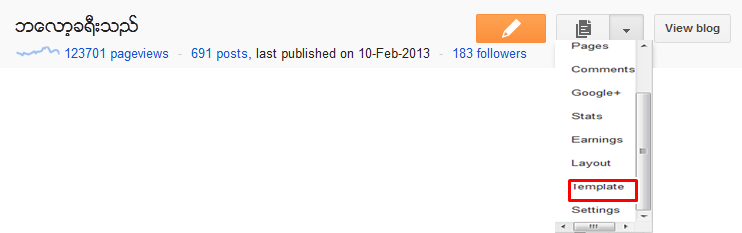
 အဆင့္ (၁) အေနနဲ႕  အေပၚကျပထားသလို  ကလစ္ျပီး template ဆိုတာကို သြားလိုက္ပါေနာ္...


          အဆင့္   (၂)  အေနနဲ႕  အေပၚပုံ က်လာျပီ  ဆိုတဲံအခါ မွာ... Customise ဆိုတာကိုကလစ္ေပး

လိုက္ပါ... အဲေနရာမွာ ဘဲ  မိမိစိတ္ၾကိဳက္  တက္ပလက္ ေတြကို ေရြးးမယ္ဆိုလဲ ေရြးခ်ယ္နိုႈင္ပါတယ္ေနာ္.


 အဆင့္  (၃)  အေနနဲ႕  ေကတာ့.. အေပၚပုံကို ၾက္ည့လိုက္ပါ.. ေဘးက layout ဆိုတာကလစ္ျပီး

မိမိတို႕ ဆိုဒ္အတြက္  ဆိုဒ္ဘားး ပုံစံ ဒီဇိုင္းေတြ ေရြးခ်ယ္လုိက္ပါ  ဘယ္ညာ ထားးမလားးး

ညာတစ္ခု ဘဲလားးးး...  ဆိုတာ ေရြးေပးေပါ့.... လိုျခင္တာ ကို စိတ္ၾကိဳက္ ေရြးးျပီး Apply to Blogs ကို

ကလစ္ေပးလိုက္ပါ..


 အဆင့္  (၄)  အေနနဲ႕  အေပၚပုံကို ၾက္ည့လိုက္ပါ... မိမိတို႕ တက္ပလက္ကို က်ယ္ နိဳင္ က်ဥ္းနိဳင္တဲ့

ေနရာေလးေပါ့... ေဘးက အနီျပထားတဲံ Adjust widths ဆိုတာကိုကလစ္ျပီး  လိုအပ္သလို

ခ်ဲ႕နိဳင္  ပါတယ္...


အဆင့္   (၅)  အေနနဲ႕... ကေတာ့
ေနာက္ဆုံးးလုပ္ေဆာင္ခ်က္  အရ... မိမိတို႕ ဘေလာေ့လး လွပေသသပ္ဖို႕  ကာလာေတြ 
ခ်ိန္ၾကမယ္.... စာလုံးးဆိုဒ္ အရြယ္အစားေတြ  ေျပာင္းၾကမယ္  ေပါ့


ေဘးမွာ အနီျပထားးတယ္  အဲကေန တစ္ခုခ်င္းဆီ  ကလစ္ျပီး  ျပင္ေပးလိုက္ပါ.
သည္ေနရာ ကိုေရာက္ဖို႕ဆိုတာက  ေဘးက Advanced ဆိုတာကလစ္ျပီး  သြားရမွာ
ျဖစ္ပါတယ္....ေနာ္..


သည္ေနရာေရာက္တာနဲ႕  ဘေလာ့ေလးး လွပေသသပ္ဖို႕  ၾကိဳက္သလို  ကလိေပေတာ့ဗ်ာ....


             ေခါင္းစဥ္ကာလာ  ေတြ... ဆိုဒ္ဘားကာလာေတြ  လင့္ကာလာေတြ 
အမိ်ဳးမ်ိဳး  ဖန္တီးနိဳင္ပါတယ္....ေနာ္..ဘေလာ့  စတင္ ဖြင့္နည္းကိုေတာ့
စာအုပ္ေတြ ေရာ အရင္ကလည္းတင္ခဲ့ဘူးးလို႕  သည္ နည္းေလးကေတာ့  အလြယ္ကူဆုံး 
ဘေလာ့ေလးကို  ျပဳျပင္နည္း


အေနနဲ႕   တင္ေပးလိုက္ရတာပါ..


တကယ္လို႕  မရွင္းးတာ မသိတာရွိခဲ့ ရင္  cbox မွာ  ေအာ္ခဲ့နိဳင္ပါတယ္...


   ကဲ အားးလုံးအဆင္ေျပပါျပီေနာ္..ေနာက္ထပ္  လိုအပ္ခ်က္ ရွိတဲ့  နည္းပညာေတြကိုလဲ ထပ္မံ  တင္ေပးးသြားးပါ့မယ္....


ေအာင္ေအာင္(မကစ)
ရဲ႕ ဘေလာ့ခရီးသည္ေလးအား အားေပးေနၾကတဲ့အတြက္ ေက်းဇဴးအထူးတင္ပါတယ္..
တုန္႕ျပန္မွဳအေနနဲ႕ fb like ေလးေတာ့ လုပ္ေပးခဲ့ၾကပါေနာ္.. တတ္စြမ္းသမွ်
ေတြ႕ ရွိသမွ်ေလးေတြကို ျပန္လည္ မွ်ေ၀ေနပါ့မယ္...။


Credit=>  www.aungsanmks.blogspot.com/ www.ledimyethar.com/ www.ninilayy.com


အီးေမးလ္တစ္ေစာင္ ပို ့တဲ့အခါ မရွိမၿဖစ္ သိသင့္တာေလးမ်ား

Unknown | 29.5.13 | Best Blogger Tips


၂၅၀ ဘီလီယံ နီးပါးရွိတဲ့ အီးေမးလ္ေတြဟာ ေန ့စဥ္ အြန္လိုင္းေပၚကေန


ပို ့ေဆာင္ ဆက္သြယ္ရင္းအသံုးၿပဳေနၾကပါတယ္။ ၂၀၁၂ ခုႏွစ္ စစ္တမ္းအရ အီးေမးလ္ မာကတ္တင္း 


အေရအတြက္ဟာ၀.၀၀၀၀၀၀၃၅ စကၠန္ ့မွာတစ္ေစာင္ႏွဳန္း ၿဖန္ ့ေ၀လ်က္ရွိပါတယ္။


အီးေမးလ္တစ္ေစာင္ ဟာ ဘယ္ေလာက္ အထိ အေရးပါသလဲ??


တခါတစ္ေလမွာ အီးေမးလ္ကို ရီပို ့တင္တဲ့အခါ ၿဖစ္ၿဖစ္ ၊ အလုပ္ရွာဖို ့ပဲ ၿဖစ္ၿဖစ္၊ စီးပြားေရးလုပ္ငန္းသံုးတာပဲ ၿဖစ္ၿဖစ္


ကိုယ္ခ်စ္ခင္တဲ့ သူတစ္ေယာက္ေယာက္ကို သတိရေၾကာင္း စာ ပို ့တာၿဖစ္ၿဖစ္ အသံုးၿပဳတက္ၾကပါတယ္။


အကယ္လို ့ကိုယ္ပို ့လိုက္တဲ့ ေမးလ္ဟာ ၿပန္စာအေနတဲ့ တုန္ ့ၿပန္တဲ့ အရိပ္အေယာင္ မေတြ ့ဘူး ဆိုရင္ေသခ်ာပါတယ္


 သင္ပို ့လိုက္တဲ့အီးေမးလ္ဟာ တစ္ခုခု မွားယြင္းေနတာပဲ ၿဖစ္ႏိုင္ပါတယ္။


အထူးသၿဖင့္ ခ်စ္သူ ခင္သူဆီကို ပို ့လိုက္တဲ ့ေမးလ္ေတာင္ ၿပန္စာမလာဘူး ဆိုခဲ့ရင္ ပို ့တဲ့ အီးေမးလ္မွာ တစ္ခုခုမွားေနပါၿပီ။


အခု တင္ၿပမဲ့ အခ်က္အလက္တစ္ခ်ိဳ ့ကေတာ့ အေကာင္းဆံုး ေမးလ္တစ္ေစာင္၊


 အခ်က္အလက္ ၿပည့္စံုတဲ့ ေမးလ္တစ္ေစာင္ ဘယ္လို


ပို ့မလဲ ဆိုတာနဲ ့အီးေမးလ္ပို ့တဲ့ အခါ အသံုးၿပဳရမဲ့ က်င့္၀တ္တစ္ခ်ိဳ ့ကို


မွ်ေ၀ သြားမွာပါ။


-- Subject Line


အီးေမးလ္တစ္ေစာင္ရဲ ့အေရးၾကီးတဲ့ အစိတ္အပိုင္းလို ့ ဆိုႏိုင္ပါတယ္။


ဒီ Subject ေနရာမွာ ထည့္ေရးထားတဲ့ စာတိုဟာ သင့္ အီးေမးလ္ကို လက္ခံရရွိတဲ့ သူအေနနဲ ့ 


ဖတ္မလား ဖ်က္မလား ဆိုတဲ့ အေတြးကိုအဆံုးအၿဖတ္ ေပးႏိုင္ပါတယ္။ 


ဟုတ္ပါတယ္.. ေမးလ္ေဘာက္စ္ ကို ေရာက္လာတဲ့ အီးေမးလ္တစ္ေစာင္မွာ


Subject က အေရးပါ ပါတယ္။ ဘာအတြက္ ပို ့တဲ့ စာလဲ ။ ဘာေၾကာင့္ ဖတ္သင့္သလဲဆိုတာကို Subject က အေၿဖပါ။


မွန္ကန္တဲ့ အခ်က္အလက္ ၿဖစ္ရမယ္။ တိက်ၿပီး ထိေရာက္ရမယ္ ။


 Subject ကို ဖတ္မိတာနဲ ့ စာပုဒ္တစ္ခုလံုးကို ဖတ္ဖို ့စိတ္ၿဖစ္ေပၚလာေစရမယ္။ 


Subject ဟာ ကိုယ္ပို ့တဲ့စာရဲ ့ အခ်က္အလက္ တို ၿဖစ္တဲ့ အတြက္ထိေရာက္ပါေစ ။ 


ရွည္လ်ားေထြၿပားတဲ့ ေခါင္းစီးစာေတာ့ မၿဖစ္သင့္ပါ။


 မၿဖစ္မေန ဖတ္ေစခ်င္တဲ့ စာဆိုရင္ စာလံုးေပါင္းနဲ ့အထားအသိုမွန္သင့္ပါတယ္။ 


အေသအခ်ာ အၾကံၿပဳခ်င္တာက No Subject ဆိုတဲ့စာကို မပို ့မိေစဖို ့လိုပါတယ္။


-- ပထမဆံုး စာေၾကာင္း


Hi ဘယ္သူ ဘယ္၀ါ ဆိုတာ ပထမဆံုးထည့္ၿပီး ႏွဳတ္ဆက္ရမွာ ၿဖစ္ပါတယ္။ 


ပို ့မည့္သူနာမည္ သိရင္လည္း သူ ့နာမည္ကို ရည္ညြန္းၿပီး ေရးရပါမယ္။


ဒါက မိမိစာပို ့တဲ့သူတို ့ဘယ္ေလာက္ အေလးထားေၾကာင္း ၿမင္သာေစပါတယ္။ 


ထိုစာေၾကာင့္က သင့္ စာတစ္ပုဒ္လံုးကို ဖတ္ဖို ့ဆြဲေဆာင္မွာ ၿဖစ္ပါတယ္။ 


--စာကိုယ္


ရွည္လ်ား ေထြၿပားတဲ့ အၿပင္ ဖတ္ရတာ လိုရင္းမေရာက္တဲ့ အီးေမးလ္ စာကိုယ္ဟာ စာပုဒ္မဆံုးခင္ အပိတ္ခံရဖို ့ၿဖစ္ႏိုင္ပါတယ္။


ဘယ္သူမွ သင့္ဘ၀အေၾကာင္းကိုဖတ္ဖို ့အခ်ိန္မေပးႏိုင္ၾကပါဘူး။ 


အဓီက ေၿပာခ်င္တာက တိုၿပီး လိုရင္းေရာက္တဲ့စာၿဖစ္ပါေစ ။ 


ကိုယ္ေပးခ်င္တဲ့ အခ်က္အလက္ကို ထိထိေရာက္ေရာက္ ေပးႏိုင္တဲ့စာၿဖစ္ပါေစ။


 ေၿပာခ်င္တဲ့ အဓိပၸါယ္ ရွင္းလင္းၿပီး လက္ခံမဲ့သူနဲ ့ တိုက္ရိုက္သက္ဆိုင္တဲ့ အေၾကာင္းအရာ ၿဖစ္ဖို ့လိုပါတယ္။


--အဆံုးသတ္


အီးေမးလ္ တစ္ေစာင္ရဲ ့အဆံုးသတ္ဟာ ေမးလ္အစပိုင္းမွာ စတင္ေရးခဲ့တဲ့ ပံုစံလို အေရးၾကီးပါတယ္။


အဆံုးသတ္ စာေၾကာင္းဟာ စာဖတ္မဲ့ သူကို ဘာကို လုပ္ေပးေစခ်င္တယ္ဆိုတာကို ရွင္းရွင္းလင္းလင္း ေဖာ္ၿပရပါမယ္။


ဒါေပမဲ့ အမိန္ ့ေပးတဲ့ ပံုစံ နဲ ့ေတာ့ မေရးရပါဘူး။


 စာေၾကာင္းအဆံုးသတ္ ဟာ သင့္ဆီက အေၿဖေကာင္းကို ေစာင့္ေနပါမယ္ တို ့ 


သင့္အၾကံညဏ္ကို ေမွ်ာ္လင့္ေနပါတယ္ လို ့ စတဲ့ စကားလံုးေတြနဲ ့


သင္ေၿပာၿပခ်င္တဲ့ စကားလံုးကို ရွင္းရွင္းလင္းလင္း ေၿပာၿပႏိုင္ရပါမယ္။


အကယ္လို ့ .... ေပါ့ေပါ့ပါးပါး စာ တစ္ေစာင္ ဆိုရင္ေတာ့ ေက်းဇူးအမ်ားၾကီးတင္ပါတယ္။


 ေလးစားစြာၿဖင့္.. ဆိုၿပီး အဆံုးသတ္ကို မိမိနာမည္ထည့္ၿပီး ေရးရပါမယ္။


ေနာက္ၿပီးအဆံုးမွာ မိမိရဲ ့ Social Network လိပ္စာမ်ားကို ထည့္သြင္းႏိုင္ပါတယ္။ 


Facebook, Twitter, LinkedIn စတဲ့ လင့္မ်ားထည့္ေပးၿခင္းဟာ ပိုၿပီး ေလးနက္ေစၿပီး မိမိကိုယ္ကိုယ္ 


ယံုၾကည္မွဳ ပိုတိုးေစပါတယ္။ အဲ့ဒီအတြက္ စာလက္ခံတဲ့ သူဟာ သင့္ကို ပေရာဖက္ရွင္နယ္ ဆန္တဲ့ 


သူတစ္ေယာက္ဆိုတာ စာဖတ္ၿပီး တန္းသိေစမွာပါ။ 


အထက္ပါ အခ်က္အလက္မ်ားကေတာ့ အီးေမးလ္ အသံုးၿပဳတဲ့ က်င့္၀တ္ တစ္ခ်ိဳ ့ပဲ ၿဖစ္ပါတယ္။


 ႏိုင္ငံ တကာမွာေတာ့ အီးေမးလ္ မာကတ္တင္း လုပ္တဲ့ အခါ အထက္ပါ နည္းမ်ားအတိုင္း 


စာလက္ခံသူမ်ားကို ဆြဲေဆာင္ၿပီး မိမိတို ့ လုပ္ငန္း ေၾကၿငာ Promotion မ်ားကို ၿဖန္ ့ေ၀ေလ့ရွိပ့ါတယ္။


တဖက္ကေနလည္း Online Marketing , Email Marketing လုပ္တဲ့ အခါ အသံုးၿပဳေလ့ရွိၿပီး


 အသံုးၿပဳမွဳ နည္းေသးတဲ့ က်ေနာ္တို ့အေနနဲ ့ ထိထိေရာက္ေရာက္ အသံုးၿပဳေစလိုတဲ့ ရည္ရြယ္ခ်က္နဲ ့ တင္ၿပလိုက္ရပါတယ္။


------------------


-------------------------


----------------------------------


ကိုလတ္(ကြ်ဲဆင္း)


Tuesday, 28 May 2013

Facebook ကေန Free Call ေခၚဆိုေပးႏိုင္တဲ့ Saytya Free Caller (Android , IOS , Window )

Unknown | 28.5.13 | | Best Blogger Tips


23


Facebook အသံုးျပဳသူေတြအေနနဲ႕ Facebook ေပၚကေနျပီး Free Call ေခၚဆိုေပးႏိုင္တဲ့ Application ေလး


တစ္ခုမွ်ေ၀ေပးလိုက္ပါတယ္ဗ်ာ။ Facebook Account တစ္ခုရွိထားရံုနဲ႕ အခုတင္ေပးလိုက္တဲ့ Application


ေလးကို အသံုးျပဳျပီး ဖုန္းေခၚဆိုႏိုင္မွာျဖစ္ပါတယ္ဗ်ာ။ Viber လိုမ်ိဳး Code ေစာင့္စရာမလိုပါဘူး Install လုပ္


ျပီးအသံုးျပဳရံုပါဘဲ။ Viber ထက္ပိုေကာင္းတဲ့အခ်က္ကေတာ့ Phone To Phone , Phone To PC , PC to PC


ေခၚဆိုႏိုင္မွာျဖစ္ပါတယ္ဗ်ာ။ Device အားလံုးမွာအသံုးျပဳႏိုင္ေအာင္ Android OS , IOS , Window OS ,


MAC OS အတြက္ ခြဲျပီးတင္ေပးလိုက္ပါတယ္ဗ်ာ။ Free Call တစ္ခုတည္း မဟုတ္ပါဘူး Free Chatting

ပါလုပ္ႏိုင္ပါတယ္ဗ်ာ။


**  Step-1.ေအာက္က Download Button ကိုႏွိပ္လိုက္ပါ  


**  Step-2. "5sec". ေလာက္ေစာင္႕ေပးပါ။


**  Step-3. "  << SKIP AD >>   ".ကိုႏွိပ္ေပးပါ။


**  Step-4. Download Link က်လာပါလိမ္႕မယ္။


**  အဆင္ေျပပါေစဗ်ာ။


အင္တာနက္ ဂ်ာနယ္ အတြဲ (၁၄) အမွတ္ (၂၀) (28.5.13)

Unknown | 28.5.13 | Best Blogger Tips


အင္တာနက္ဂ်ာနယ္ကို အပတ္စဥ္ တနလၤာ တိုင္းတင္ေပးသြားမွာျဖစ္ပါတယ္ဗ်ာ။ အင္တာနက္ဂ်ာနယ္ ကိုဖတ္ခ်င္သူမ်ားအတြက္မူရင္းဆိုဒ္က ေနေဒါင္းလုပ္လင္႕ကိုတင္ေပးလိုက္တာပါဗ်ာ။ အင္တာနက္ဂ်ာနယ္


၀ယ္ဖတ္စရာမလိုေတာ႕ဘူးေပါ႕။ အခုအပတ္မွာ အင္တာနက္ ဂ်ာနယ္ အတြဲ (၁၄) အမွတ္ (၂၀)ကို တင္ေပး


လိုက္ပါတယ္ဗ်ာ။ ဒီေန႕ 28 ရက္ေန႕ထြက္ Update ေလးပါ ။ ဂ်ာနယ္ကို၀ယ္ဖတ္ရန္အတြက္အဆင္ မေျပ


ေသာေနရာေဒသမွ သူငယ္ခ်င္းမ်ားအားလံုးအဆင္ေျပၾကပါေစဗ်ာ။


**  Step-1.ေအာက္က Download Button ကိုႏွိပ္လိုက္ပါ  


**  Step-2. "5sec". ေလာက္ေစာင္႕ေပးပါ။


**  Step-3. "  << SKIP AD >>   ".ကိုႏွိပ္ေပးပါ။


**  Step-4. Download Link က်လာပါလိမ္႕မယ္။


**  အဆင္ေျပပါေစဗ်ာ။